
Isolate any endpoint showing confirmed compromise, active beaconing, or lateral movement immediately. Use full isolation as the default for managed devices, since it cuts off network access while keeping the connection your EDR tools need to keep working. Reserve selective isolation for the rare case where a compromised machine also runs communications the business can't lose mid-incident.
TL;DR:
- Full isolation is recommended for managed devices to prevent communication with attacker infrastructure while allowing forensic collection through a management tunnel.
- Isolate devices only after confirming compromise or suspicious activity, prioritizing full isolation unless business-critical functions require selective measures.
- Testing VPN configurations, especially split-tunnel setups, is essential before incident response to prevent management traffic from being blocked or routed improperly.
- Automating isolation should be limited to high-confidence detections and low false-positive scenarios, with strict exclusion lists for critical systems and audit trails for all actions.
- Gathering comprehensive evidence during the containment window and thoroughly verifying device disconnection before release reduces the risk of reinfection or incomplete remediation.
Table of Contents
- What is the right device isolation response for a suspected compromise?
- How does device isolation actually work?
- Step-by-step containment: what to do from alert to first evidence
- When and how do you safely release a device from isolation?
- Can device isolation be automated safely?
- What are the common pitfalls in device isolation, and how do you avoid them?
- How does AI telemetry change device isolation decisions?
- Lessons from the SOC: what actually matters when the alert fires
- How Alectura fits into your device isolation and containment workflow
- Sources
What is the right device isolation response for a suspected compromise?
The decision usually comes down to three questions: is compromise confirmed, is the device actively talking to something it shouldn't, and does the business need it to stay partially online? Get those answers before you touch anything.
Triage triggers that justify isolation:
- Confirmed malware execution or a high-confidence EDR detection tied to known attacker infrastructure
- Beaconing to a command-and-control domain, even at low frequency
- Evidence of lateral movement, such as unusual SMB or RDP connections from the host
- Signs of data staging or exfiltration, including large outbound transfers to unfamiliar destinations
- High-severity alerts correlated across multiple detection sources on the same asset
Once one of those triggers fires, work through this decision order:
- Confirmed compromise, no business-critical function on the device — apply full isolation immediately.
- Confirmed compromise, device runs something the business can't lose (a call centre workstation mid-shift, a production build agent) — apply selective isolation and flag it for expedited full isolation once the workaround is in place.
- Suspicious but unconfirmed activity — consider network segmentation or a monitoring hold instead of isolation, and escalate for a second opinion.
- Offline or unreachable device — queue the isolation request so it executes on next check-in, per Red Canary's isolation documentation.
Most EDR platforms require a specific analyst role, often labelled "Security Operator" or "Response Actions" permission, before isolation commands will execute. Confirm your account has that role assigned before an incident, not during one. Once isolation is live, immediately kick off forensic evidence collection, start a live-response session if the tooling allows it, and push any confirmed indicators (hashes, domains, IPs) into your blocking controls so the rest of the fleet isn't exposed to the same threat.
How does device isolation actually work?
Full isolation and selective isolation solve different problems, and mixing them up is one of the more common mistakes analysts make under pressure.
Full isolation disconnects the endpoint from every network resource except the connection back to your EDR platform. Microsoft Defender for Endpoint's isolation API documents three distinct modes: Full, Selective, and UnManagedDevice, with Full recommended for managed devices in most scenarios. The device can't reach the internet, can't talk to other hosts on the LAN, and can't exfiltrate anything further. But it isn't truly dark: a restricted management tunnel stays open so analysts can run live response and pull forensic packages while the machine sits isolated.
Selective isolation carves out exceptions for named applications, typically things like Outlook or Teams, so a user can keep working on communications while the rest of the device is locked down. It trades some containment strength for continuity, which is exactly why it should be the exception, not the default.
Isolation doesn't mean blind. Isolated devices retain a management channel back to the EDR service specifically so investigators can keep collecting evidence, per Microsoft's guidance on response actions. Treat that channel as a lifeline, not a loophole.
VPN configuration matters more than most playbooks admit. A full-tunnel VPN can inadvertently route or block the management traffic your EDR agent depends on, effectively blinding the SOC to a device it thinks is isolated but monitored. Split-tunnel VPN configurations, which route EDR management traffic outside the encrypted tunnel, are the recommended fix, and it's worth testing this on a sample of remote laptops before you need it in anger.
Offline endpoints don't get isolated on the spot. The command queues and fires the moment the device next checks in with the management server, which Red Canary's documentation confirms is standard behaviour across EDR platforms. Log the queued action anyway. If a laptop stays dark for three days after a queued isolation request, that's its own signal worth chasing.
Step-by-step containment: what to do from alert to first evidence
Treat this as a checklist you can run verbatim mid-incident, not a reference document to study later.
1. Gather context before you act
Pull the basics before you touch the isolation button: device owner, business criticality, last-seen timestamp, and whether the machine runs through a VPN or corporate proxy. A production database server and a marketing laptop both get isolated, but the blast radius and stakeholder list look completely different.
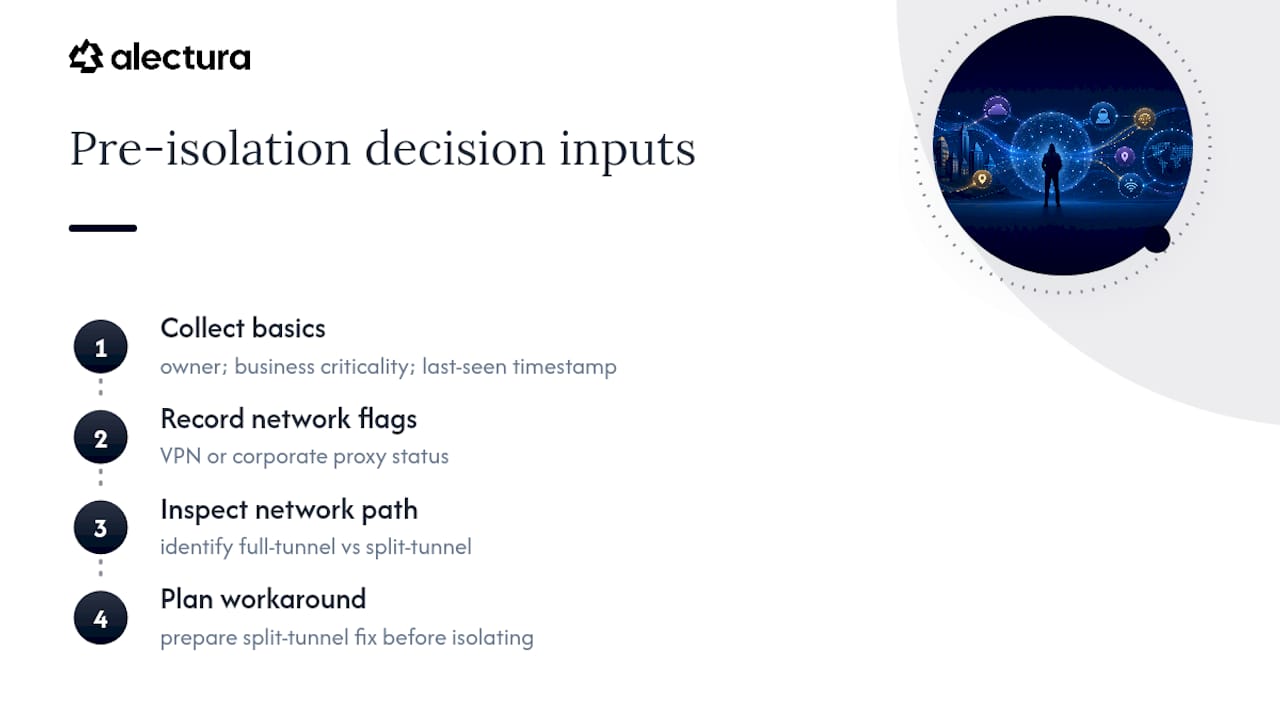
Check the device's current network path. If it's on a full-tunnel VPN, expect possible connectivity gaps once isolation is applied, and plan your split-tunnel workaround now rather than discovering the problem after the device goes dark.
2. Apply isolation and start collection
Choose full isolation unless a documented, pre-approved exception applies. Trigger the isolation command through your EDR console or API, then immediately:
- Kick off the forensic evidence package collection (memory dump, process list, network connections, running services)
- Start a live-response session if your platform supports interactive shell access on isolated devices
- Note the exact timestamp the isolation command was issued and when it was confirmed applied
Pro Tip: Isolation confirmation and isolation initiation aren't the same event. Some EDR platforms show a "pending" state for several minutes before the device confirms it's actually cut off. Don't assume containment until you see the confirmed status.
3. Verify the device is actually contained
This step gets skipped more often than it should. Confirm isolation worked by checking:
- The device no longer appears in active network flow logs or firewall connection tables.
- The management/EDR heartbeat is still reporting in (proof the investigative channel survived isolation).
- No new outbound connections appear in telemetry after the isolation timestamp.
- A test ping or connection attempt from another internal host to the isolated device fails as expected.
If the heartbeat drops along with everything else, you've likely hit the full-tunnel VPN problem described earlier, and you need the split-tunnel fix before you can trust the device is genuinely monitored rather than just dark.
4. Collect evidence while the device is quiet
With the endpoint contained, this is the best window to gather clean evidence. Pull memory and disk artefacts if your tooling supports remote forensic collection, capture a snapshot of running processes and scheduled tasks, and export any relevant logs (authentication, PowerShell, EDR detection history) covering the suspected compromise window.
5. Log, notify, and hand off
Record the isolation action in your ticketing system with the timestamp, the analyst who issued it, the justification, and the mode used. Notify the device owner's manager and, for anything touching customer data or production systems, loop in incident response leadership immediately rather than waiting for a scheduled update. An incomplete audit trail here is one of the more common gaps auditors flag after the fact, and it's entirely avoidable with a two-minute ticket update.
When and how do you safely release a device from isolation?
Releasing a device too early is arguably riskier than isolating it too late, because a premature release can hand the attacker back their foothold with the SOC's guard down. As one point of guidance on this puts it plainly: restoring network access without validated remediation risks immediate reactivation of attacker infrastructure.
Remediation checklist before you even consider release:
- Eradicate confirmed persistence mechanisms (scheduled tasks, registry run keys, malicious services, rogue browser extensions)
- Reset every credential that touched the device during the compromise window, not just the primary user account
- Apply outstanding patches tied to the initial access vector, if one was identified
- Rotate any API keys, tokens, or session cookies that were active on the device
Verification comes next, and it should be more than a quick scan. Run a full endpoint scan with updated signatures, confirm there's no beaconing activity over a monitoring window (24 to 72 hours is typical for most SOC playbooks), and review telemetry for the period since isolation was applied to make sure nothing tried to phone home while contained.
| Release stage | What to confirm | Typical duration |
|---|---|---|
| Remediation | Persistence removed, credentials rotated, patches applied | Hours to 1 day |
| Verification scan | Clean endpoint scan with current signatures | Same day as remediation |
| Monitoring window | No beaconing or anomalous telemetry | 24 to 72 hours |
| Staged re-enablement | Limited network access, heightened logging | 1 to 3 days |
Stage the re-enablement rather than flipping the device straight back to full access. Grant limited connectivity first, watch closely, and set explicit re-isolate triggers, defined in advance, so nobody has to make that call under pressure a second time.
Microsoft Defender for Endpoint automatically lifts isolation after a set period if nobody releases it manually, according to its documented response-action behaviour, so build a calendar reminder into your process rather than relying on the platform default to align with your remediation timeline. For the rare unresponsive device that won't accept a release command, most platforms provide a forced-release script or recovery procedure, worth locating and testing before you're stuck at 2am with a device that won't come back online.
Can device isolation be automated safely?
Automatic attack disruption can shave critical minutes off containment time, and most modern EDR platforms now support playbook-driven isolation triggered by predefined conditions. Whether you should turn it on depends entirely on how well you've tuned it first.
Where automation earns its place:
- High-confidence detections with a documented, low false-positive history (ransomware behaviour signatures, confirmed credential-dumping tools)
- Correlated multi-stage attack chains where speed matters more than a human double-check
- Off-hours coverage when analyst response time would otherwise stretch past an acceptable window
Where it needs guardrails:
- Business-critical servers, domain controllers, and production build systems belong on an exclusion list by default, not isolated automatically
- Any device tagged as running a life-safety or revenue-critical process needs a documented exemption reviewed regularly, not a one-time setup
- New detection rules should run in monitoring-only mode first
Test any new automation rule in monitoring mode before it's allowed to isolate anything, and keep it there long enough to see how it behaves against real traffic. Red Canary's guidance on automation recommends maintaining an explicit exclusion list for critical assets specifically to avoid outages from false positives, a lesson usually learned the expensive way otherwise.
Every automated isolation event needs an audit trail: what triggered it, which asset it hit, and whether a human reviewed it afterward. Set an emergency override process too, a documented way for an on-call lead to reverse an automated action fast when it turns out to be a false positive on something the business can't afford to have offline.
What are the common pitfalls in device isolation, and how do you avoid them?
Most isolation failures aren't technical; they're planning gaps that surface at the worst possible moment.
Full isolation can take down more than the target machine. A host running child virtual machines, containerised workloads, or shared services can drag dependent systems down with it. Map these dependencies for critical assets in advance and build pre-approved exemptions or a documented workaround before the incident, not during it.
VPN and proxy configurations quietly break EDR connectivity. A full-tunnel VPN routes management traffic through the same pipe as everything else, and when isolation kicks in, that traffic can get blocked along with the malicious traffic you're trying to stop. Split-tunnel configurations that carve out EDR management traffic are the standard fix, and they should be tested on remote endpoints well before an incident forces the issue.
Offline and remote endpoints need compensating controls. A device that's unreachable can't be isolated in real time, only queued. Until it checks in, physical safeguards matter more: enforce strong screen locks, confirm remote wipe capability is active, and keep backups current so a lost or stolen device doesn't become a bigger problem than a network compromise, following the baseline controls CISA recommends for device security generally.
Poor communication turns containment into chaos. Isolating a device without warning the right stakeholders creates confusion, help-desk tickets, and sometimes a well-meaning IT admin trying to "fix" the isolated machine mid-investigation.
Pro Tip: Build a short, pre-written notification template for isolation events; business unit, expected duration, who to contact. Sending it within minutes of isolation cuts down on panicked escalations far more effectively than a perfect technical response does.
How does AI telemetry change device isolation decisions?
Standard EDR alerts were built to catch malware, credential theft, and lateral movement. They weren't built to catch a browser copilot quietly reading a spreadsheet full of customer records, or an AI coding assistant with a connection to an MCP server nobody on the security team has approved. That gap is where isolation decisions get harder in 2026.
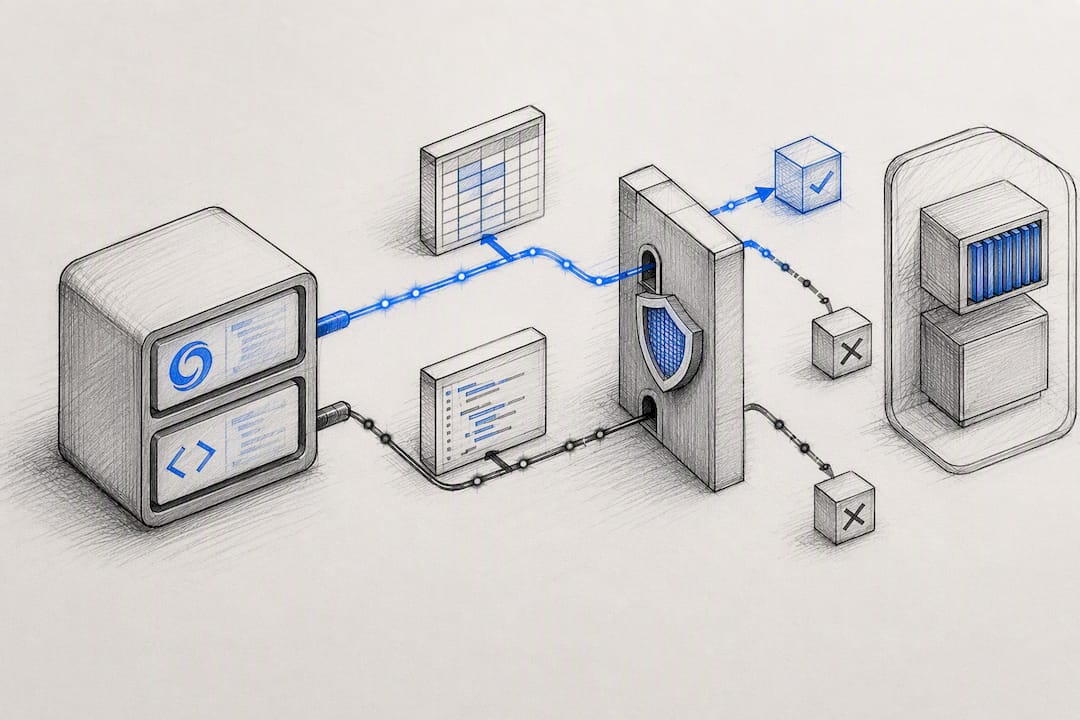
AI-specific telemetry, shadow AI usage, prompt injection attempts, and unapproved MCP connections, surfaces risk vectors that standard alerts routinely miss, and it should influence how urgently you contain a device even when traditional indicators look mild. A device running an unmonitored MCP server integration with write access to a CRM looks nothing like a traditional compromise, but the exfiltration risk can be just as real.
Where this changes the containment calculus:
- A copilot with broad file-system access on a device flagged for suspicious activity raises the urgency to isolate, even without a confirmed malware hit
- Prompt injection signals against an AI assistant handling sensitive data warrant the same triage priority as a phishing click
- Unapproved AI tool usage discovered during an unrelated investigation should trigger a parallel inventory check, not just a note in the ticket
Alectura's AI Detection and Response platform is built to sit alongside your existing EDR isolation workflow rather than replace it. It discovers the AI tools running across your fleet, inventories what access each one holds, and watches what they connect to through MCP and similar integrations, so an analyst deciding whether to isolate a device has AI-specific context, not just traditional process and network telemetry. Because Alectura works at the endpoint level, isolation actions taken through your EDR tooling don't blind you to what the AI layer was doing right up to the moment containment kicked in. For teams wanting the fuller picture of where this fits, the agentic endpoint security explainer covers the category in more depth, and the AI security glossary is a useful reference for terms like shadow AI and MCP that show up increasingly often in incident write-ups.
Lessons from the SOC: what actually matters when the alert fires
Three rules hold up better than most formal procedures once you've sat through enough 3am pages. First, isolate on confidence, not certainty. If you're waiting for absolute proof before containing a device, the attacker has already had extra hours you didn't need to give them. Second, selective isolation is a tool for specific, named exceptions, not a default you reach for because full isolation feels disruptive. Third, the release decision deserves more rigour than the isolation decision, because getting it wrong the second time means the attacker gets a second run at the same target with a SOC that's already stood down.
The best example of selective isolation done right isn't dramatic: a compromised workstation tied to a live customer support queue, isolated selectively so the communications app kept running while everything else got locked down, buying the team four hours to remediate without a service outage on top of a security incident.
Documentation is the part everyone shortcuts and regrets. A one-line ticket update saying "isolated, investigating" tells nobody anything six months later during an audit or a post-incident review. Write down the trigger, the mode, the timestamp, and the reasoning every time, even when it feels obvious in the moment. It won't feel obvious in six months.
— Nathan
How Alectura fits into your device isolation and containment workflow
Traditional EDR isolation locks down the network layer. It doesn't tell you what the AI tools on that device were doing before, during, or after containment, and in 2026 that's often the exact detail an investigation needs. Alectura is built to close that gap: it discovers every AI tool running across your fleet, inventories the access each one holds, and tracks what they connect to through MCP and other integrations, so your isolation decisions and your post-incident timeline both have the full picture.

That means when an analyst is deciding whether a device needs full isolation right now, Alectura's telemetry, prompt timeline tracking, real-time detection of exposed secrets, PII, or prompt injection, sits alongside your existing EDR alerts rather than in a separate blind spot. It integrates with SIEM and SOAR workflows, so containment decisions and AI-risk signals land in the same place your team already works. If you're weighing up whether shadow AI usage is inflating your attack surface, the agentic endpoint security explainer is a solid starting point, and the pricing page lays out how per-endpoint deployment scales for a security team ready to close that visibility gap.
Sources
The isolation modes, VPN guidance, and release behaviour covered in this playbook draw on Microsoft Defender for Endpoint's isolation API documentation and its broader guidance on response actions, both useful for exact command syntax and platform-specific behaviour. Red Canary's isolation documentation covers offline endpoint queuing and automation playbook design in more operational detail. For physical device safeguards and compensating controls when isolation alone isn't enough, CISA's guidance on protecting the physical security of digital devices is worth keeping on hand. Readers wanting a broader primer on EDR fundamentals can also check Mavericks Office Solutions' overview of endpoint detection and response.
- Take response actions on a device in Microsoft Defender for Endpoint
- Isolate endpoints (Red Canary docs)
- Protect the physical security of your digital devices (CISA)