
Blocking AI tools effectively means layering four control types: network filtering (proxy, DNS, SSE), endpoint controls (MDM and extension allowlisting), cloud and API restrictions (blocklists and lockdown modes), and a governance register that maps every decision to an enforcement control. Discovery has to come before enforcement, or you're blocking blind. The trade-off is straightforward: allowlisting gives tighter control but more helpdesk tickets, blocklisting is faster to deploy but always a step behind new tools, and platform lockdown modes cut risk at the cost of features your teams may actually need.
TL;DR:
- Blocking AI tools effectively requires a layered approach combining network filtering, endpoint controls, cloud restrictions, and governance mapping.
- Category blocking via vendor platforms captures most unsanctioned tools quickly, but FQDN and extension controls are necessary for precise or off-network threats.
- Cloud API controls and lockdown modes help limit internal platform abuse, but cannot replace foundational network or endpoint controls.
- Maintaining an up-to-date discovery process and a detailed enforcement register ensures policies are applied correctly and auditable.
- Starting with discovery before enforcement creates a scoped, manageable security setup that adapts to new AI tools as they emerge.
Table of Contents
- Quick controls checklist you can act on today
- Network-level controls: proxy, DNS and SSE filtering
- Endpoint-level controls: MDM, extension allowlisting and egress controls
- Cloud and API controls: blocklists, content filters and lockdown modes
- Governance: build an allowlist/blocklist register and map it to enforcement
- Detect and monitor shadow AI: discovery, telemetry and response
- Implementation checklist: step-by-step rollout and verification
- Why discovery paired with enforcement actually works
- Where Alectura fits when you're ready to enforce
- Sources
- FAQ
Quick controls checklist you can act on today
Start with the moves that give you the most coverage for the least engineering effort, then tighten from there.
- Turn on category blocking. Most SSE and proxy platforms ship an "Artificial intelligence" web category. Block it tenant-wide and you close off the bulk of unsanctioned tools in one policy change.
- Add high-risk FQDNs manually. Category rules miss new or niche domains, so maintain a supplementary blocklist for specific endpoints and known crawler ranges, an approach Microsoft Entra's web content filtering supports directly.
- Lock down browser extensions via MDM. Disable unmanaged installs and enforce an allowlist so AI copilots and sidebar assistants can't sneak in through a browser store.
- Apply vendor-side content filters. For teams handling sensitive data, configure blocklists in platforms like Azure OpenAI as a second line of defence.
- Verify and monitor. Test a blocked FQDN, check the logs, and confirm the block actually fired before you move to the next team.
Network-level controls: proxy, DNS and SSE filtering
Category blocking is fast because it inherits the vendor's classification of thousands of AI domains at once, but it's blunt. FQDN blocking is precise, useful when you need to permit one approved tool while blocking everything adjacent to it, but it doesn't scale to the pace new AI products launch.
Secure Service Edge (SSE) proxies inspect traffic at the session level, which lets you scope rules by user group rather than applying a blanket rule to the whole tenant. That matters because a rule built for finance shouldn't necessarily hit engineering. Pairing SSE with Conditional Access avoids the common mistake of blocking a managed service account that a legitimate integration depends on.
- Category rules suit tenant-wide baseline restrictions.
- FQDN rules suit exceptions, specific vendor endpoints, or known crawler traffic.
- Cloudflare's AI bot policies classify crawlers by behaviour, Search, Agent, or Training, and default settings for new domains change on 15 September 2026 to block Training and Agent bots on pages carrying ads.
- Watch for TLS inspection gaps and VPN tunnelling as your two most common bypass routes.
Pro Tip: Run a TLS decryption check on your proxy before rolling out AI category blocks. If inspection isn't happening on encrypted traffic, your "block" rule is cosmetic, not real.
Endpoint-level controls: MDM, extension allowlisting and egress controls
Network filtering stops nothing on a laptop that's off the corporate network. Endpoint controls close that gap.
- Push MDM policies that enforce a browser extension allowlist, block unsigned installers, and require managed accounts for any AI plug in.
- Audit installed extensions and background agents regularly. Anything calling an external AI API without an approval record needs investigation, and any exposed API key found in that process should be rotated immediately.
- Tie endpoint DLP and secret scanning into the same enforcement workflow so a flagged extension automatically triggers a data exposure check, not just a removal ticket.
- For BYOD devices you can't fully manage, combine user awareness training, network-level restrictions, and a fast, low-friction exception process for genuine business needs.
Unmanaged devices are where most shadow AI actually lives, not on the corporate fleet where MDM already has a foothold.
Cloud and API controls: blocklists, content filters and lockdown modes
Vendor-side controls matter most for teams building on top of AI platforms rather than just browsing to them.
- Azure OpenAI blocklists let you create term lists, regex or exact match, and apply them directly to prompts and completions through the Azure blocklist API, with a cap of 10,000 terms per list.
- OpenAI's Lockdown Mode restricts live web browsing, image handling, Agent mode, and other network-capable features to shrink the surface for prompt-injection driven data exfiltration, but it is built for high-sensitivity environments, not for everyday use, since it disables features people rely on.
- Cloudflare's behaviour-based blocking distinguishes Search, Agent, and Training bot activity, so site owners can permit search indexing while blocking bots scraping content for model training.
None of these replace network or endpoint controls. They're the layer that catches what gets through, or what originates inside your own API traffic rather than a browser.
Governance: build an allowlist/blocklist register and map it to enforcement
A policy document that lists banned tools but never touches a proxy rule is a paper ban, and paper bans don't stop anyone.
- Treat the register as the actual decision record: tool name, decision, rationale, owner, and next review date.
- Against every register row, list the technical control enforcing it, a proxy rule ID, an MDM profile name, or an API blocklist reference.
- Define an exception workflow with compensating controls (extra logging, DLP scoping) and clear rollback conditions.
- Set a review cadence and decide upfront what evidence you'll need if an auditor asks why a tool is permitted or blocked.
This pattern, pairing a register with enforcement mapping across proxy, DNS, MDM and egress controls, is what turns a policy into something you can actually defend during an audit.
Detect and monitor shadow AI: discovery, telemetry and response
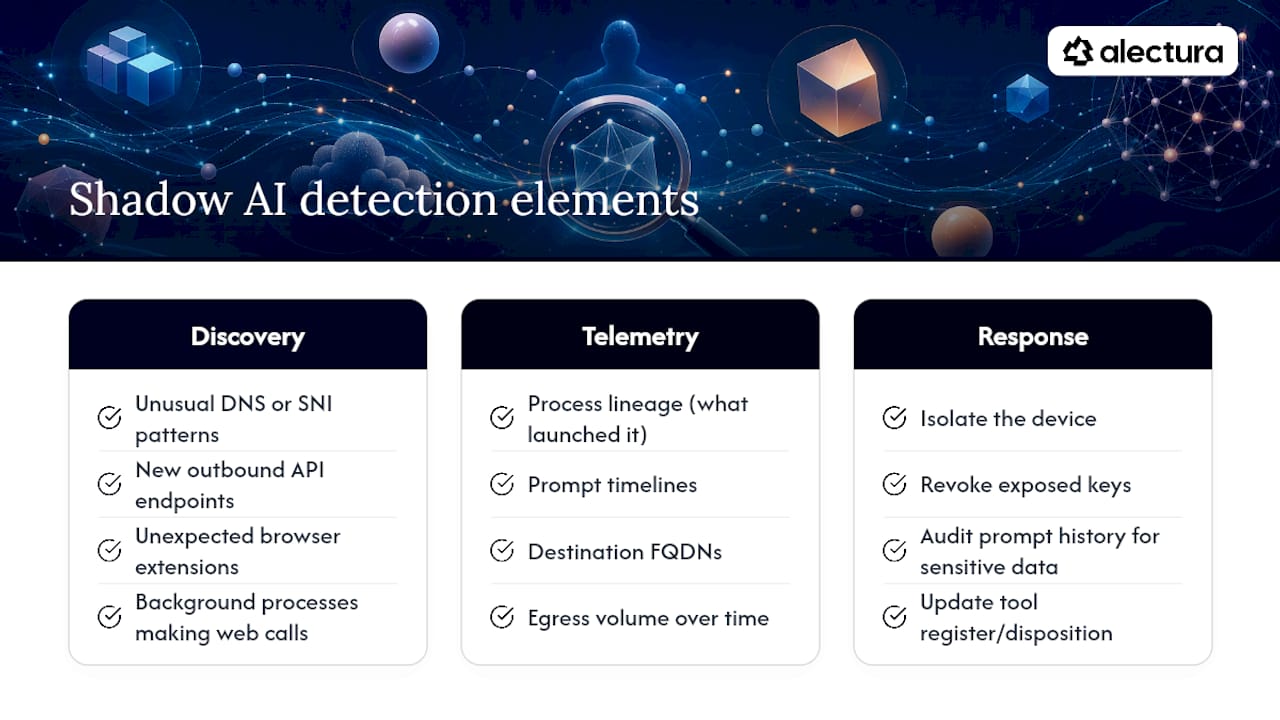
You can't enforce a rule against a tool you don't know exists. Discovery signals worth watching include unusual DNS or SNI patterns, new outbound API endpoints appearing in egress logs, unexpected browser extension inventories, and background processes making web calls no one approved.
Once you're collecting that signal, the telemetry that actually helps an investigation includes process lineage (what launched the AI client), prompt timelines, destination FQDNs, and egress volume over time. When something trips a rule, the response playbook is short: isolate the device, revoke any exposed keys, audit the prompt history for sensitive data, and update the register with the new tool's disposition.
This is the operational gap AI Detection and Response approaches address: inventorying AI tools at the endpoint and giving security teams the visibility to enforce guardrails rather than guess at them. Our AI tool discovery playbook walks through this in more depth.
Pro Tip: Log prompt timelines, not just connection events. A blocked connection tells you a tool tried to run; a prompt timeline tells you what data it touched before you caught it.
Implementation checklist: step-by-step rollout and verification
Roll this out in stages, not as a single tenant-wide switch flip.
- Define scope and data sensitivity tiers, then map which control category applies to each tier.
- Pilot with one team: configure proxy category rules and MDM extension policies, then log every block and false positive for a week.
- Run verification tests: a blocked FQDN attempt, an extension trying to submit data externally, and a prompt caught by an Azure OpenAI blocklist.
- Measure outcomes: track the drop in unmanaged AI calls, DLP hits tied to AI destinations, and incidents linked back to an AI tool.
Azure's own blocklist tooling supports large term sets with regex or exact matching, which gives you room to tune precision during the pilot before scaling the same rules tenant-wide.
Why discovery paired with enforcement actually works
Most organisations write an AI policy before they've inventoried a single tool, and that order is backwards. Policy without enforcement is a memo, not a control, and I've seen enough "restricted AI tools" documents sit unread while a marketing team pastes customer data into a chatbot nobody vetted.
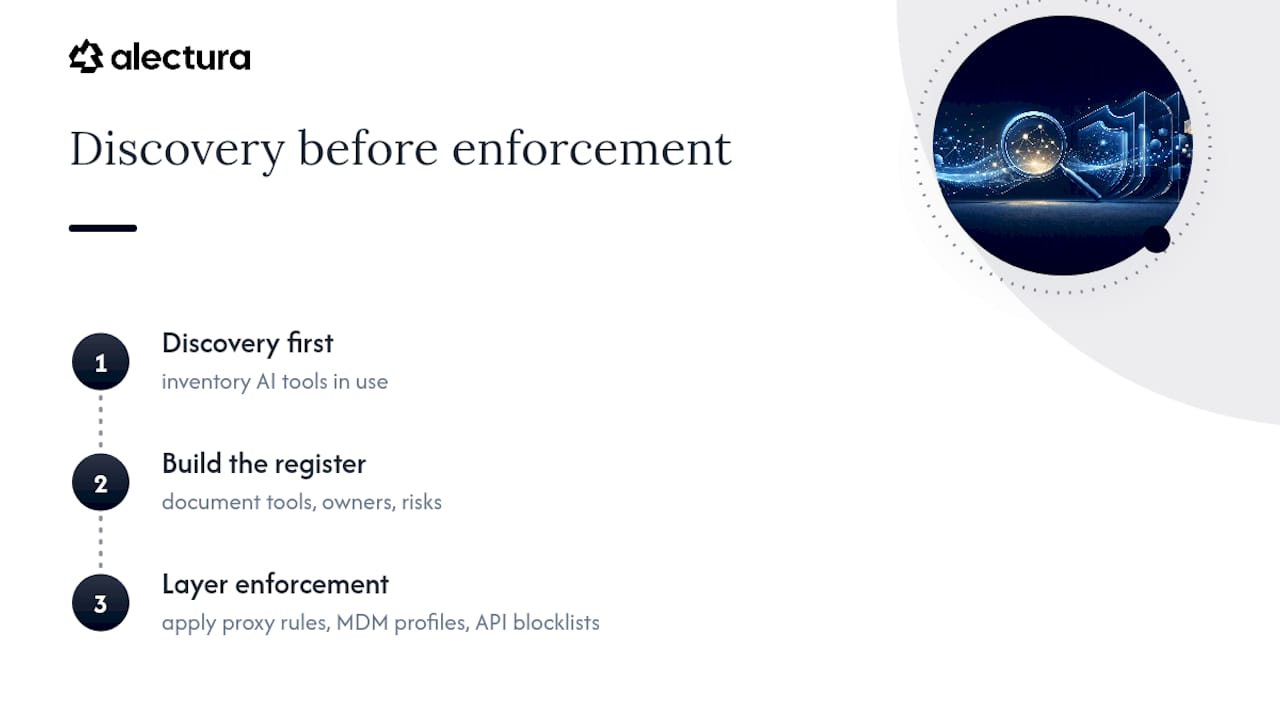
The teams getting this right run discovery first, build the register second, and only then layer proxy rules, MDM profiles, and API blocklists on top of what they've actually found. Favour that order. Blocking a tool you don't know exists is impossible; discovering it first turns a scramble into a scoped, defensible decision.
— Nathan
Where Alectura fits when you're ready to enforce
Extending your existing proxy and MDM rules covers a lot of ground, but neither tells you what's already running on a device before you write the rule. Some AI Detection and Response platforms provide security teams device-level visibility into the AI tools actually in use, copilots, browser assistants, MCP integrations, with inventory, prompt timeline tracking, and real-time detection of secrets, PII, or policy violations before that data leaves the endpoint, leveraging expertise from an AI Automation agency.

That's a practical difference from network-only tools: enforcement happens at the source, not after traffic has already left, and it can plug into existing SIEM and SOAR workflows rather than replacing them. If you're past the point of manual audits and want a system that inventories, monitors, and enforces guardrails automatically, check current pricing or read more about how agentic endpoint security works before you scope your next rollout.
Sources
For the exact commands and templates referenced above: Cloudflare's AI bot blocking configuration guide covers behaviour-based policies for site owners. Microsoft's generative AI app management guidance explains Defender for Cloud Apps and Entra content filtering, including Copilot's Conditional Access caveats. The Azure OpenAI blocklist documentation has REST examples for prompt and completion filtering, and the restricted AI tools policy template provides an enforcement mapping structure you can adapt directly.
- Lockdown Mode | OpenAI Help Center
- Block AI Bots · Cloudflare bot solutions docs
- Use blocklists - Azure OpenAI
FAQ
Is there any way to block AI tools completely?
No single control blocks every AI tool, since new ones launch constantly, but combining category based network filtering, MDM extension allowlisting, and API level blocklists closes off the large majority of unsanctioned access.
Is there any way to stop AI from accessing company data?
Yes, pair endpoint DLP and secret scanning with your blocklist enforcement so any AI tool that does slip through still can't move sensitive data out, and isolate the device the moment a policy violation fires.
Which tool can remove AI from my systems?
There's no single removal tool, since AI shows up as browser extensions, desktop apps, and API integrations. Discovery platforms like Alectura inventory what's actually running so you can uninstall or block each one individually rather than guessing.
How do I block AI tools from appearing in Google search results?
That's a site owner control, not an endpoint control: configure Cloudflare's AI bot policies to block Training or Agent classified crawlers while still allowing standard Search indexing.