
AI tool discovery, in the security sense, means detecting, inventorying and continuously monitoring the copilots, assistants and autonomous agents running on enterprise endpoints so your team can enforce policy, prevent data loss and respond to incidents before they escalate. The single action to take right now: run a full discovery sweep across your fleet, create an AI Bill of Materials (AIBOM) entry for every tool found, and table a concise finding at your next board or risk committee meeting.
Your sweep must cover at minimum:
- Endpoint copilots and assistants — Microsoft 365 Copilot, GitHub Copilot, IDE-embedded assistants
- Browser extensions with AI capabilities, including those installed under personal accounts
- Autonomous agent runtimes and orchestration frameworks running locally or via SaaS
- Model Context Protocol (MCP) connections and any persistent agent-to-agent channels
- On-device or locally hosted models and their file-system artefacts
Pro Tip: Run the sweep before you brief the board, not after. Discovering a high-risk extension mid-presentation is not a good look.
Key takeaways
AI tool discovery is the foundation of AI risk governance: without a current AIBOM and continuous endpoint monitoring, boards and regulators have no evidence of control.
| Point | Details |
|---|---|
| Run a discovery sweep immediately | Use EDR telemetry, browser extension scans and proxy logs to find every AI tool on your fleet. |
| Build and maintain an AIBOM | Document model name, vendor, data access scope and egress destinations for every AI tool found. |
| Update vendor contracts now | Require AIBOM delivery, data residency confirmation, 24-hour incident notification and audit rights before renewing. |
| Report MTTR and coverage to the board | Regulators expect remediation throughput to keep pace with AI tool deployment rates. |
| Alectura AIDR covers the full cycle | Alectura discovers, inventories, monitors and enforces policy across AI tools on enterprise endpoints. |
Table of Contents
- Why Australian regulators are demanding AI tool discovery now
- What belongs in your AI usage inventory
- How to detect AI tools running across your endpoints
- What to require from AI vendors before you sign or renew
- Turning discovery into a repeatable operational process
- Your 30–90 day implementation roadmap
- How Alectura's AIDR supports your discovery programme
- The gap most security teams are still missing
- Get endpoint-level AI visibility with Alectura
- Sources
Why Australian regulators are demanding AI tool discovery now
The urgency is not theoretical. ASD guidance on agentic AI frames agentic systems as a supply-chain and operational risk, recommending identity separation for agents, provenance checks and an AIBOM as baseline controls. That is not aspirational language; it is the standard ASD expects organisations to demonstrate.
APRA's targeted supervisory findings under CPS 230 and CPS 234 have consistently flagged gaps in third-party and technology risk management. AI tools procured outside formal vendor channels sit squarely in that gap. ASIC's open letter to AFS licensees went further, endorsing defensive AI use as part of the security stack while making clear that governance and testing must accompany it.
The practical consequence: the window between a vulnerability being discovered and it being exploited is compressing. Boards that relied on annual risk reviews and policy documents are now exposed. "We have policies" is not a defensible position when a regulator asks for evidence of control.
ASD guidance co-authored with the Australian Institute of Company Directors goes one step further, asking boards to treat foreign ownership or control of AI providers as a material cyber risk. If your organisation uses an AI tool whose parent company is subject to foreign government direction, that is a board-level disclosure item, not just a procurement footnote.
What belongs in your AI usage inventory
Scope ambiguity is where discovery programmes fail. Teams argue about whether a particular tool counts, and the sweep never gets done. Use these definitions to remove that argument.
Inventory items your AIBOM must capture:
- Endpoint copilots (browser-integrated, OS-level, application-embedded)
- Browser-based AI assistants and extensions, including those on personal profiles
- IDE and code assistants (GitHub Copilot, Cursor, similar)
- Autonomous agents and orchestration runtimes (local and SaaS-hosted)
- On-device or locally cached models and their associated artefacts
- MCP endpoints and persistent hosted model service connections
- Third-party SaaS features with embedded AI/ML inference
The AIBOM captures AI-specific metadata: model name and version, vendor, data access scope, egress destinations and update cadence. The SBOM captures the underlying software components. They are complementary, not interchangeable. An AI tool with a clean SBOM can still carry significant AIBOM risk if it exfiltrates prompts to an offshore inference endpoint.
How to detect AI tools running across your endpoints
Detection works across three layers: the device, the network and the SaaS/API plane. No single layer gives complete coverage.
On-device signals include process names and parent-child relationships for known agent runtimes, local model artefacts in common directories, browser extension manifests listing AI-related permissions, and file-system indicators such as model weight files or vector store databases.
Network and MCP telemetry covers unusual egress to inference API endpoints, persistent agent-to-agent connections, MCP protocol indicators in proxy logs and API key usage patterns that suggest automated rather than human-initiated calls.
SaaS and API signals include OAuth authorisations granted to AI applications from personal accounts, file uploads embedded in prompts, and SSO logs showing access to AI services not in the approved catalogue.
CSA research confirms that conventional CASB and EDR tooling regularly misses browser extensions and agent egress, recommending browser-native discovery and dedicated agent monitoring as supplements.
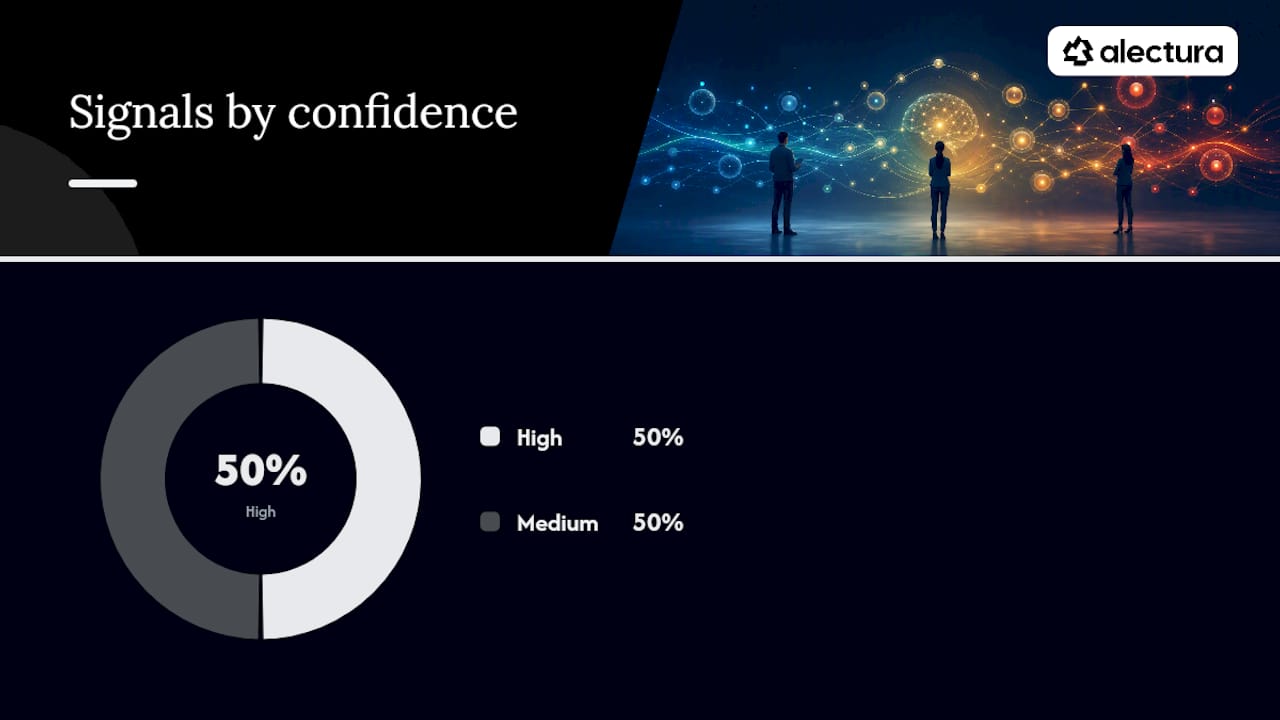
| Signal | Source log | Confidence | Next action |
|---|---|---|---|
| Known AI process name | EDR telemetry | High | Classify, add to AIBOM |
| Browser extension with AI permissions | Extension manifest scan | High | Review, block or approve |
| Egress to inference API endpoint | Proxy / SASE logs | Medium | Correlate with user, triage |
| MCP connection pattern | Network telemetry | Medium | Isolate agent, investigate |
| Personal-account OAuth grant | SSO / IdP logs | Medium | Contact user, revoke if unauthorised |
| Prompt file upload | CASB / DLP logs | High | Immediate DLP review |
Pro Tip: *Shadow AI is concentrated in a small cohort of heavy users. Akamai and LayerX analysis finds a large share of enterprise AI conversations occur through personal accounts.
What to require from AI vendors before you sign or renew
Procurement is where most organisations have the most leverage and use the least of it. Before signing or renewing any AI vendor contract, require these deliverables in writing.
Required vendor artefacts:
- Current AIBOM and SBOM, updated on each model version change
- Model provenance documentation (training data sources, fine-tuning history)
- Data residency confirmation for Australian data, including inference-time processing
- Vulnerability disclosure programme with defined SLAs
- Incident notification commitment within 24 hours of a confirmed breach affecting your data
Contract clauses to include:
- Audit rights covering model behaviour, data handling and subprocessor chains
- Continuity of service obligations if the vendor is acquired or subject to foreign government direction
- Training-data restrictions prohibiting use of your prompts or outputs to train shared models
- Human-in-the-loop assurances for any agentic workflow with write or execute permissions
Cyber.gov.au's AI and ML supply-chain guidance maps these requirements to NIST adversarial ML taxonomies and provides a structured vendor due-diligence framework. Use it as your baseline questionnaire. Prioritise vendors with the broadest data access first: your code assistant before your meeting summariser.
Turning discovery into a repeatable operational process
Discovery without process is just a list. The operational model has four steps:
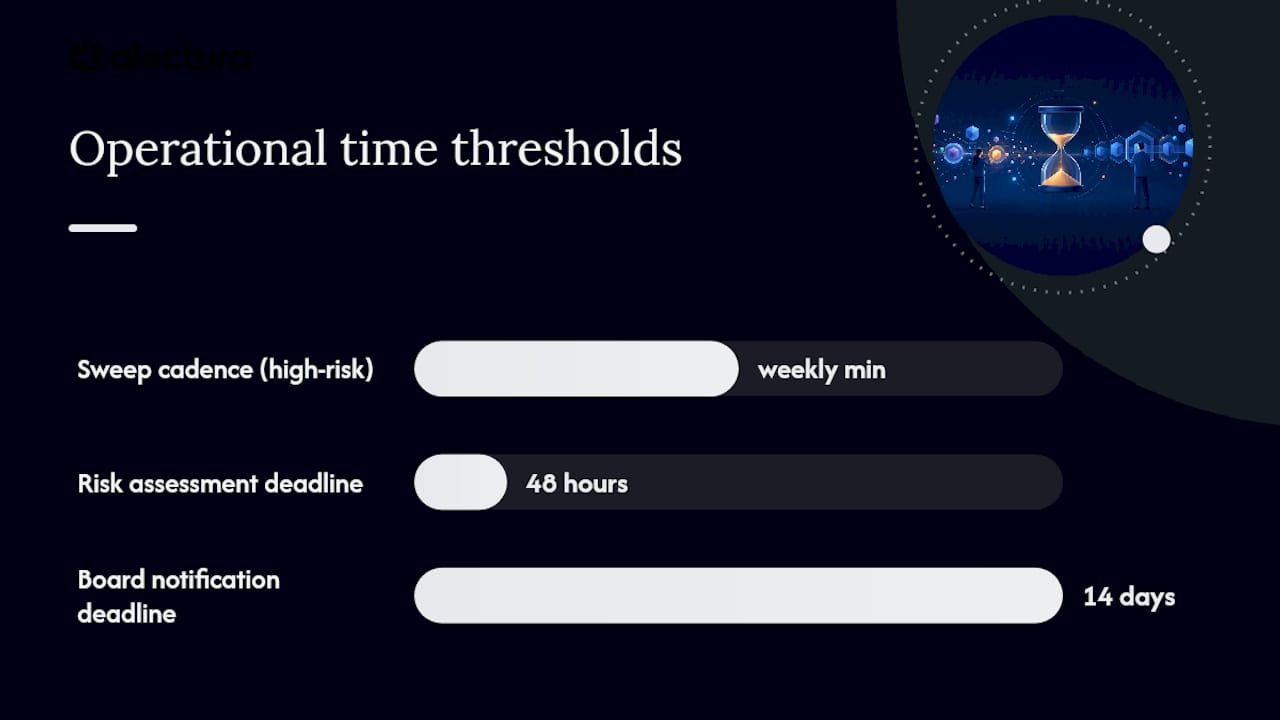
- Discover — run automated sweeps across endpoints, browser profiles and network telemetry on a defined cadence (weekly minimum for high-risk environments).
- Classify — assign each finding an AIBOM entry with data access scope, egress destinations and a risk tier (critical, high, medium, low).
- Prioritise — triage by data sensitivity and blast radius. An agent with write access to your CRM is higher priority than a read-only summarisation tool.
- Remediate or mitigate — block, restrict, approve with guardrails, or escalate to vendor risk for contract remediation.
Roles: The CISO owns the programme and board reporting. The SOC runs sweeps and triage. Procurement owns vendor questionnaires and contract clauses. Cloud ops manages MCP and API egress controls. Legal reviews training-data and foreign-control clauses. Product owners declare AI tools in their applications.
Metrics boards will ask for: endpoint coverage percentage, time-to-detect new AI tools, MTTR for policy violations, AIBOM completeness score and policy enforcement rate. Regulators expect remediation throughput to keep pace with the rate of new AI tool deployment, not lag it by quarters.
Escalation thresholds for regulator reporting: any AI tool with access to regulated data (health, financial, personal) discovered outside the approved catalogue should trigger a formal risk assessment within 48 hours and a board notification if it cannot be remediated within 14 days.
Your 30–90 day implementation roadmap
Days 1–30: quick wins
- Run an initial discovery sweep using EDR telemetry, browser extension scans and proxy logs.
- Block browser extensions with AI permissions that are not in the approved catalogue.
- Create AIBOM entries for your top three AI vendors by data access volume.
- Run a 90-minute tabletop exercise: "An unapproved AI agent has been exfiltrating prompts for 30 days. What do we do?"
- Report initial findings to the board or risk committee with a coverage percentage and a remediation plan.
Days 31–60: integration and process
- Integrate discovery outputs into your SIEM for continuous correlation.
- Update vendor questionnaires to include AIBOM, data residency and incident notification requirements.
- Begin contract remediation with your highest-risk AI vendors.
- Instrument AI agent monitoring for any agentic workflows already in production.
Days 61–90: operational maturity
- Publish an operational AIBOM covering all approved AI tools, reviewed monthly.
- Finalise SLA changes with critical vendors, including 24-hour incident notification.
- Validate your patch and remediation cadence against the metrics defined in step four above.
- Present a coverage and MTTR trend to the board, showing improvement from day one.
How Alectura's AIDR supports your discovery programme
Alectura is purpose-built for this problem. Where EDR gave security teams visibility over what runs on the device, Alectura's AIDR platform gives them the same visibility over the AI running on it.
Capability mapping:
- Endpoint discovery — identifies copilots, assistants and agent runtimes across the fleet, including tools installed under personal browser profiles
- Browser and extension visibility — scans extension manifests and monitors AI-related permissions in real time
- Prompt timeline tracking — logs what AI tools receive and send, creating an audit trail for incident response and regulator evidence
- MCP and egress monitoring — watches agent-to-agent connections and MCP channels for anomalous behaviour
- SIEM and SOAR integration — feeds findings into your existing security stack for correlation and automated response
- Policy enforcement and guardrails — lets you set and enforce rules at the endpoint without blocking legitimate use
The output is exactly what boards and auditors need: AIBOM entries, coverage metrics, incident timelines and policy enforcement rates in a single pane.
Pro Tip: Use Alectura's AI data loss prevention capabilities alongside discovery to catch sensitive data leaving the organisation through prompt submissions, not just through traditional file transfer channels.
The gap most security teams are still missing
The standard framing treats AI tool discovery as a technical problem. Run a sweep, find the tools, block the bad ones. That framing misses the harder half of the work.
The real exposure for most Australian enterprises right now is not the AI tool they know about and approved. It is the agent a developer spun up six weeks ago that has read access to the production database, writes to an external API, and appears nowhere in the vendor register. Discovery finds it. But what happens next depends entirely on whether you have a process, a playbook and a person whose job it is to act.
Boards are moving from passive policy-setting to active oversight. The ASD and AICD guidance on foreign control of AI vendors signals that clearly. A CISO who can show a live AIBOM, a coverage trend and a sub-14-day MTTR for policy violations is in a fundamentally different conversation with their board than one who can only show a policy document.
The other point worth naming: AI supplier foreign control is a material supply-chain risk, not a geopolitical abstraction. If a vendor's inference infrastructure is subject to direction from a foreign government, your data processed through that vendor is potentially accessible to that government. That belongs in your risk register and your board papers, not just your vendor questionnaire.
Get endpoint-level AI visibility with Alectura
Security teams that have run their first discovery sweep consistently find AI tools their existing stack had no record of. Alectura gives you the endpoint-level visibility to find them, the AIBOM infrastructure to document them, and the guardrails to manage them without slowing your people down.

Alectura deploys per endpoint on a subscription model, with most enterprise environments reaching initial coverage within days of deployment. To see what is running on your fleet right now, request an AIDR demo and we will walk you through a live discovery run against your environment.