
Yes, with conditions. ChatGPT Enterprise can handle sensitive enterprise data safely when configured correctly and paired with independent monitoring, but "correctly configured" is doing a lot of work in that sentence. OpenAI backs the platform with SOC 2 Type II and ISO/IEC 27001 attestations, and it maps against frameworks like NIST SP 800-207 for zero trust controls. That said, a Check Point proof of concept found a hidden outbound channel in ChatGPT's code execution runtime capable of silent data exfiltration, patched only in February 2026.
If you're deploying ChatGPT Enterprise this quarter, treat these as non-negotiable first moves:
- Enforce SSO/SCIM provisioning before a single seat goes live.
- Lock down data retention settings at the workspace level.
- Apply Lockdown Mode to any group handling regulated or high-value data.
- Add AI-native detection at the endpoint, not just at the platform layer.
Pro Tip: Don't wait for a vendor patch cycle to protect your data. Vendor fixes close known holes after disclosure; independent detection catches the ones nobody's found yet.
Key Takeaways
Securing ChatGPT Enterprise requires layering vendor-native controls, verified compliance artefacts, and independent AI-native detection, because platform certifications alone don't cover endpoint-level exfiltration risk.
| Point | Details |
|---|---|
| Vendor controls are a floor | SOC 2, ISO 27001, and AES-256 encryption cover the platform but not endpoint-level prompt injection or exfiltration. |
| Verify, don't assume | Confirm non-training and retention settings explicitly at the workspace level rather than assuming defaults. |
| DNS exfiltration is real | Check Point's proof of concept showed data leaving through DNS queries, patched only in February 2026. |
| Tier your defences | Apply Lockdown Mode to high-sensitivity groups rather than the whole tenant to avoid crippling productivity. |
| Close the detection gap | Alectura provides endpoint-level AI Detection and Response to catch what platform controls and certifications don't see. |
Table of Contents
- Core ChatGPT Enterprise security features and what they actually cover
- Documented incidents and real risks security teams can't ignore
- Compliance, certifications and governance you need to verify yourself
- How to deploy ChatGPT Enterprise securely: a rollout checklist
- Why AI-native detection closes the gap vendor controls leave open
- What to do if you suspect an AI-related data exfiltration event
- A CISO's take on where ChatGPT Enterprise fits your stack
- Alectura closes the visibility gap ChatGPT Enterprise leaves open
- Where to verify these controls yourself
- Frequently asked questions
- Sources
Core ChatGPT Enterprise security features and what they actually cover
ChatGPT Enterprise ships with a genuinely solid baseline. The gap most security teams miss isn't in what's provided. It's in assuming the baseline is the whole job.
Encryption is handled properly: AES-256 for data at rest and TLS 1.2 or higher for data in transit, per OpenAI's Trust Portal. That protects data in storage and in motion between endpoints and OpenAI's infrastructure. It does nothing to stop a user pasting a client's medical record into a prompt, or a compromised session exfiltrating data through an application-layer channel that never touches the storage or transport layer at all.
Identity and access controls are where the platform earns its enterprise label. SAML SSO, SCIM for automated provisioning and deprovisioning, role-based access control, and an admin console with domain verification give IT teams the levers to enforce least privilege from day one. Get SCIM wired into your identity provider before rollout. Retrofitting it after 3,000 employees have self-registered accounts is a miserable exercise.
On data ownership, OpenAI states customer content is not used to train its models by default, and workspace admins can configure retention windows. Verify this setting explicitly. It's not always the default your legal team assumes.
Compliance artefacts, including SOC 2 Type II reports and ISO 27001, 27017, 27018, and 27701 certificates, are downloadable through the Trust Portal, alongside audit logs, workspace analytics, and a Compliance API for feeding activity into your existing logging platform.
- AES-256 encryption at rest, TLS 1.2+ in transit
- SAML SSO, SCIM, RBAC, admin console with domain verification
- Configurable retention and non-training-by-default policy
- SOC 2 Type II and ISO 27001/27017/27018/27701 via Trust Portal
- Audit logs and Compliance API for SIEM integration
Documented incidents and real risks security teams can't ignore
Vendor certifications describe the environment as designed. They say very little about how that environment fails in practice, and the most instructive failure so far came from independent researchers, not OpenAI itself.

Check Point Research demonstrated a hidden outbound channel inside ChatGPT's code execution runtime that let a single crafted prompt turn an ordinary session into a covert exfiltration path, using DNS queries to smuggle file contents and metadata out of a supposedly isolated environment. The proof of concept also showed remote command execution was possible. OpenAI patched the flaw by early 2026, and The Register later confirmed the patch date and flagged the regulatory exposure for healthcare and financial services firms using the platform during the vulnerable window.
DNS is usually trusted as innocuous traffic. That's precisely why it worked as a smuggling channel; most network monitoring simply isn't tuned to flag DNS anomalies as an AI exfiltration vector, per Check Point's own follow-up analysis.
Prompt injection and malicious GPTs compound the problem. A user doesn't need to be careless; a poisoned document or a compromised third-party GPT can trigger the same kind of exfiltration without the user ever authoring the malicious instruction themselves.
"Enterprises must not assume AI tools are secure by default," TechRadar noted in its coverage of the patch, arguing that proactive monitoring and guardrails need to sit alongside, not behind, vendor fixes.
A vendor patch closes one specific hole. It doesn't retroactively cover the exposure window, and it doesn't guarantee the next infrastructure-level side channel won't surface somewhere else in the stack. If regulated data moved through an exposed session before the patch, that's potentially a reportable event under GDPR or HIPAA, regardless of whether anyone noticed at the time.
Compliance, certifications and governance you need to verify yourself
Certifications tell you what was audited, not what applies to your specific deployment. Request the actual documents rather than taking marketing pages at face value.
Ask for the current SOC 2 Type II report and the ISO 27001, 27017, 27018, and 27701 certificates through the Trust Portal, then have your compliance team check the audit scope against your actual use case, not just the certificate's existence. Data residency terms and the non-training guarantee should also be pinned down contractually, not assumed from a help page, and cross-checked against Alectura's own Master Subscription Agreement approach to data processing clauses as a benchmark for what "in writing" should look like.
For regulated sectors, treat ChatGPT Enterprise as part of your regulated environment, not an exception to it. Healthcare organisations handling ePHI need to map usage against HHS Security Rule requirements, and our guide to HIPAA AI compliance covers the specific technical controls auditors expect. Financial services and public sector teams face parallel scrutiny under their own frameworks.
- Request SOC 2 Type II report and ISO 27001/27017/27018/27701 certificates directly.
- Confirm data residency and non-training terms in the contract, not just documentation.
- Audit every third-party GPT, connector, and Action for its own data access scope.
- Treat regulated data flows through ChatGPT as subject to existing compliance obligations.
Pro Tip: Third-party GPT Actions are the supply chain risk nobody budgets for. Each connector is effectively a new vendor with its own access footprint, and it deserves the same scrutiny you'd give a new SaaS integration request.
How to deploy ChatGPT Enterprise securely: a rollout checklist
Security teams that treat this as a procurement decision rather than a deployment project tend to get burned in month three, when shadow usage and unreviewed connectors have already outpaced whatever policy existed at launch.
- Pre-rollout: provision identity via SSO and SCIM, define roles by data sensitivity, classify what data each business unit can input, and get legal sign-off on retention and non-training terms.
- Configuration: enable retention controls and confirm non-training settings at the workspace level, whitelist approved models and third-party tools, and turn on audit logging with Compliance API access.
- Network controls: route AI traffic through inspected egress points, apply CASB or proxy controls to limit outbound paths, and enable Lockdown Mode for groups working with regulated or high-value data.
- Monitoring: feed logs into your SIEM/SOAR stack and instrument AI-native telemetry that can see prompt-level activity, not just network flow.
- Ongoing operations: run periodic risk reviews, require approval for new connectors and Actions, manage seat lifecycle as staff join and leave, and train users on prompt hygiene.
- Segment workspaces by sensitivity before rollout, not after an incident.
- Lockdown Mode reduces exfiltration risk but disables web and connector features, so reserve it for genuinely high-risk groups rather than the whole tenant.
- Revisit connector approvals quarterly. Shadow integrations accumulate fast.
Pro Tip: Run a tabletop exercise simulating a compromised GPT before you go live, not after. It's the fastest way to find out whether your monitoring actually catches what it's supposed to.
Why AI-native detection closes the gap vendor controls leave open
Vendor controls handle the platform. They don't see what happens on the endpoint where an employee actually uses ChatGPT alongside a browser copilot, an IDE assistant, and a dozen other AI tools your security stack has no visibility into. That's the layer where prompt injection, malicious GPTs, and unsanctioned tool use actually play out, and it's largely invisible to traditional EDR.
Defence in depth for AI means combining OpenAI's platform controls with independent observability at the point where humans and AI actually interact. Industry analysts increasingly frame this as identity-based monitoring married to automated governance, rather than either alone.
In practice, that looks like AI Detection and Response: discovering every AI agent and copilot running across your fleet, tracking prompt timelines to spot injection attempts, and enforcing policy automatically when a session touches sensitive data or an unapproved connector. Alectura's approach follows this exact pattern: discover the agents, classify the data flows they touch, then enforce policy and containment, tuning detection rules as prompt patterns emerge.
- Pilot AIDR on one high-risk business unit first.
- Map data flows between that unit's AI tools and sensitive systems.
- Expand coverage to the full fleet once detection rules are tuned.
Pro Tip: Start your pilot with the team that has the messiest AI usage, not the cleanest. That's where you'll actually learn what your policy is missing.
What to do if you suspect an AI-related data exfiltration event
Speed matters more than perfection in the first hour. A structured sequence beats an improvised one every time.
- Contain immediately: isolate the affected workspace or user accounts, preserve audit logs and Compliance API output before they roll over, and freeze any active connectors or revoke tokens tied to the session.
- Triage technically: pull runtime artefacts, review the prompt timeline for injection markers, check for malicious GPTs or suspicious uploaded files, and trace outbound DNS or egress patterns for anomalies matching known exfiltration techniques.
- Remediate: revoke and rotate affected credentials, apply any outstanding platform patches or shift the workspace into Lockdown Mode, and update network controls to block the observed channel.
- Notify: loop in legal and compliance early to assess whether the event crosses a regulatory breach threshold under GDPR, HIPAA, or a sector-specific rule, and prepare stakeholder communications before regulators ask questions you haven't answered internally.
- Review: run a root-cause analysis, update your AI usage policy based on what actually happened, tune detection rules accordingly, and rehearse the whole sequence in a tabletop exercise before the next real incident.
Pro Tip: Preserve logs before you start remediating. Teams that rotate credentials first and export logs second frequently lose the exact evidence a regulator will ask for.
A CISO's take on where ChatGPT Enterprise fits your stack
Here's the uncomfortable part most vendor briefings skip: SOC 2 and ISO certificates tell you the platform was built and operated to a standard. They don't tell you whether your specific deployment, with your specific connectors and your specific users, is safe today. Treat every vendor control as necessary and assume none of them are sufficient on their own.
The practical move is tiering. Not every team needs Lockdown Mode, and forcing it everywhere just trains people to route around it. Reserve the strictest settings for the groups actually touching regulated or high-value data, and spend the rest of your budget on people and process: onboarding discipline, prompt hygiene training, and someone whose actual job is reviewing new connector requests before they go live.
Alectura closes the visibility gap ChatGPT Enterprise leaves open
Vendor controls stop at the platform edge. Alectura sees what happens after that, on the endpoint, where ChatGPT sessions, browser copilots, and IDE assistants actually run and where prompt injection and data exfiltration attempts actually surface.

Alectura gives security teams AI Detection and Response built for exactly this gap: it discovers every AI tool running across your fleet, inventories the access each one holds, tracks prompt timelines for injection or exfiltration patterns, and lets you enforce policy automatically without slowing your people down. It's built for security leaders managing enterprise deployments who need endpoint-level proof that ChatGPT Enterprise usage is actually safe, not just certified. If you've already worked through the checklist above and want to close the detection gap it leaves, start with an AIDR pilot on your highest-risk business unit and see what your current stack has been missing.
Where to verify these controls yourself
Don't take a vendor's summary of its own security posture at face value. Pull the primary documents.
- OpenAI Trust Portal for SOC 2 reports, ISO certificates, and encryption details.
- Check Point's original research for full technical detail on the DNS exfiltration flaw.
- Lockdown Mode documentation for configuration and trade-offs.
- NIST SP 800-207 for zero trust principles applicable to AI integrations.
- HHS HIPAA guidance for healthcare-specific obligations.
Request the SOC 2 report, ISO certificate, and data processing addendum directly from your OpenAI account team before signing off on deployment.
Frequently asked questions
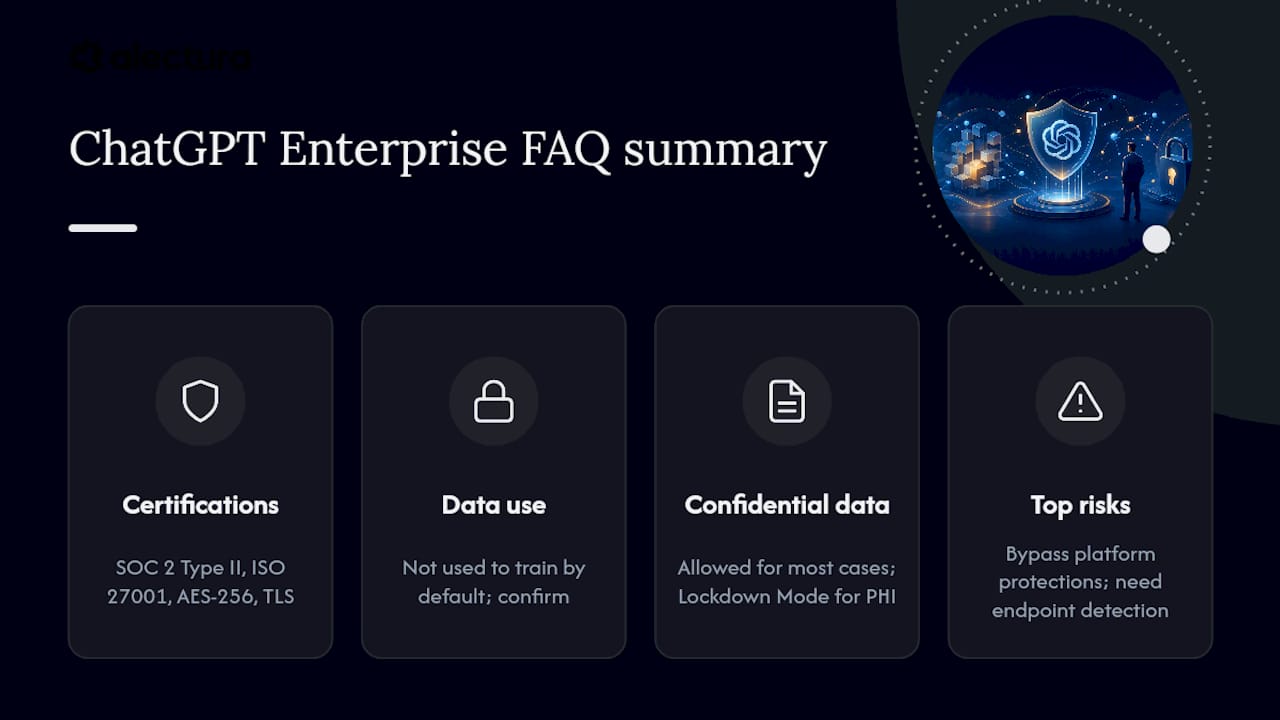
How secure is ChatGPT Enterprise really? It carries genuine enterprise-grade certifications, including SOC 2 Type II and ISO 27001, plus AES-256 encryption and TLS in transit. Independent research has also found infrastructure-level vulnerabilities, including a DNS-based exfiltration flaw patched by early 2026, so certifications alone don't guarantee safety without additional monitoring.
Can I put confidential information into ChatGPT Enterprise? You can for most business use cases once retention and non-training settings are confirmed at the workspace level. For highly regulated data such as protected health information, apply stricter controls like Lockdown Mode and verify contractual data handling terms first.
Does OpenAI train its models on customer data from ChatGPT Enterprise? OpenAI states customer data is not used to train models by default under this plan. Confirm this explicitly in your contract and workspace settings rather than assuming it applies automatically to every configuration.
What's the biggest ChatGPT Enterprise data leakage risk right now? Infrastructure-level side channels, like the DNS exfiltration method Check Point demonstrated, and prompt injection through malicious GPTs or poisoned documents. Both bypass standard platform-level protections and require endpoint-level detection to catch.
Do I need a separate AI security tool alongside ChatGPT Enterprise? Most security teams do. Vendor controls protect the platform itself, but they don't provide visibility into how AI tools behave on individual endpoints, which is where AI Detection and Response platforms like Alectura fill the gap.
Sources
- ChatGPT Data Leakage via a Hidden Outbound Channel in the Code Execution Runtime - Check Point Research
- A hard truth for the AI era: don’t assume AI tools are secure by default | TechRadar
- OpenAI trust portal
- NIST SP 800-207: Zero Trust Architecture
- HIPAA laws and regulations | HHS