
For enterprise teams, securing Copilot-style agents is fundamentally an endpoint problem. That means discovering every local Copilot agent running across your fleet, switching on runtime inspection in audit mode, and enforcing guardrails before sensitive data walks out the door. The immediate priority is a discovery pilot: find what's already running, then layer in audit-mode detection while you classify the data these agents can touch.
TL;DR:
- Discover and inventory all existing Copilot and AI agents across endpoints within two to four weeks, prioritizing high-access, high-risk agents first.
- Use agent-native hooks, network inspection, and API enforcement together, starting with audit mode to tune detection rules before moving to blocking.
- Assign clear ownership to the SOC, engineering teams, data governance, and the CISO, with policies centered on explicit permissions, data classification, and scheduled allowlist reviews.
- Roll out runtime protections gradually: baseline normal behavior, enable audit mode, then expand enforcement by business unit, and incorporate structured telemetry for ongoing monitoring.
- Continuously review model updates, plugin changes, and agent lifecycle events, treating each revision as a new attack surface to preserve visibility and security effectiveness.
Table of Contents
- How do you find every Copilot and AI agent on your endpoints?
- Which runtime protection method actually catches prompt injection?
- Who should own Copilot security, and what should the policy say?
- What's the right rollout order for Copilot runtime protection?
- How should you respond to an AI-driven security incident?
- What does continuous monitoring look like for AI copilots?
- What compliance obligations apply to Copilot use in the enterprise?
- How do you train staff on the risks Copilot introduces?
- How should model updates and lifecycle changes be governed?
- Alectura's perspective: where AIDR fits around runtime protection
- Get visibility over every Copilot agent before you write another policy
- Sources
How do you find every Copilot and AI agent on your endpoints?
You can't secure what you can't see, and Copilot is a moving target. Users install Copilot integrations inside VS Code, Edge, Microsoft 365 apps, and dozens of third-party extensions that quietly bundle their own AI assistants. Each one inherits the logged-in user's privileges, and each one can read, summarise, and move sensitive data without triggering a single identity or access alert. Standard IAM tools were never built to see this layer of activity, which is exactly why Microsoft's own governance guidance for Copilot stresses that inventory and continuous monitoring have to sit alongside conventional access controls, not replace them.
A proper discovery sweep pulls from several signal sources at once: endpoint sensors, Agent 365 observability feeds, MCP (Model Control Plane) connection logs, and MDM telemetry from platforms like Intune, which can already block or allow specific AI apps on managed Android devices. For every agent you find, record:
- Who owns it and which team requested it
- Which platform or IDE it runs inside
- What privileges and data stores it can reach
- Every downstream connection, including MCP servers and plugins
- Version and update cadence
Run this as a time-boxed window, two to four weeks is realistic for a mid-size fleet, and triage by risk rather than volume. An agent with read access to a code repository and three MCP connections deserves attention well before a low-privilege chatbot plugin.
Pro Tip: Don't wait for a full inventory before acting. Flag and isolate the top five highest-access agents in week one, then keep discovering in parallel.
Which runtime protection method actually catches prompt injection?
Three approaches exist, and they solve different problems. None of them replaces the other two.
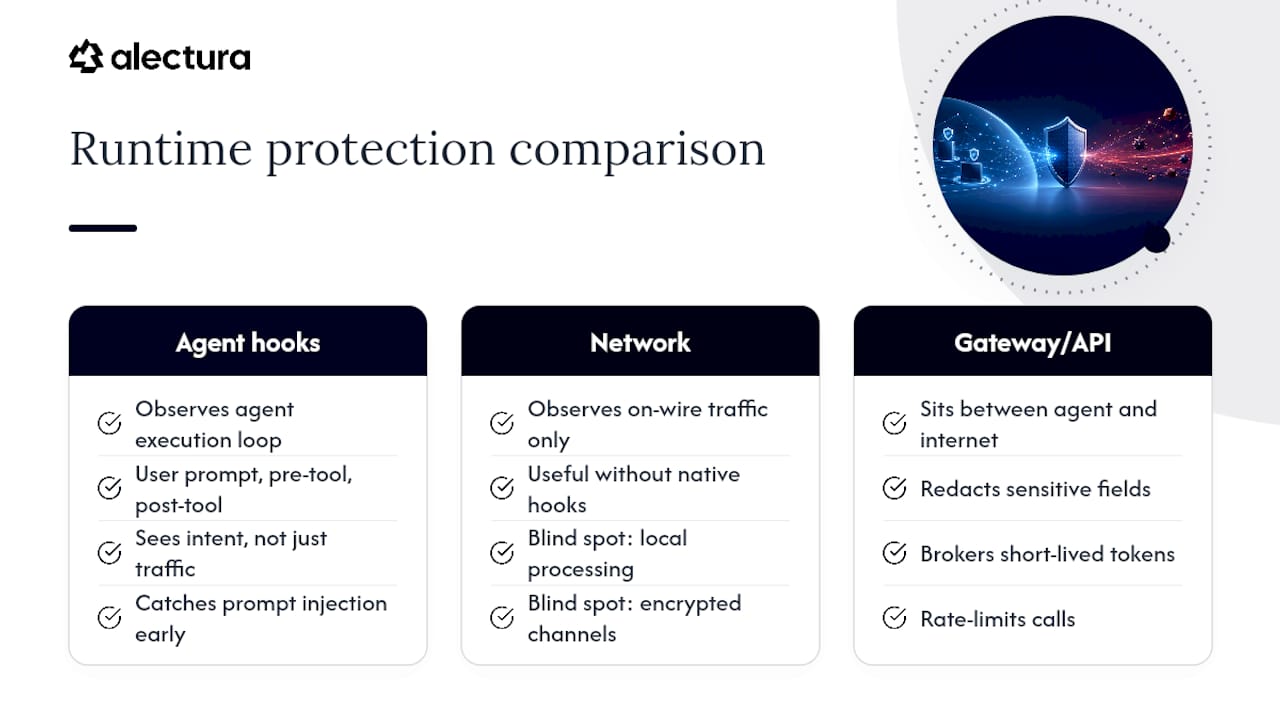
Agent-native hooks inspect the agent's own execution loop at three points: the user prompt, the pre-tool call, and the post-tool response. This is how Microsoft Defender for Endpoint's AI agent runtime protection works, and it's the only method that catches prompt injection early enough to stop a malicious instruction before the agent acts on it. Because the hook sits inside the agent's own process, it sees intent, not just traffic.
Network inspection watches what the agent talks to over the wire. It's useful for agents that don't expose native hooks, but it has a real blind spot: local-only processing and encrypted channels give it nothing to inspect. Microsoft's own documentation on this pairing is candid that agent-native hooks and network inspection are complementary, not interchangeable — one covers what the other misses.
Gateway and API-level enforcement sits between the agent and the outside world, redacting sensitive fields, brokering short-lived tokens instead of static credentials, rate-limiting calls, and applying policy-as-code frameworks such as OPA. This layer is where you turn detection into actual prevention.
70% of organisations lack optimised AI governance according to IOActive's analysis of AI adoption risk, and the gap usually traces back to skipping this exact layering: teams deploy one control and assume it covers everything.
The sequencing matters more than the tooling choice. Start every new detection rule in audit mode, log what would have been blocked, review the false-positive rate for a couple of weeks, then flip to block mode with tamper protection enabled so an agent can't disable its own oversight.
Pro Tip: If your SOC has never tuned a detection rule for an AI agent before, expect a noisier first fortnight than you're used to. Agents call tools far more often than humans click buttons.
Who should own Copilot security, and what should the policy say?
Ownership fragments fast if you let it. Engineering wants agents shipped, the SOC wants visibility, and platform teams want to avoid becoming the AI helpdesk. Centralise accountability with the CISO and assign clear operational responsibilities underneath that single point of ownership:
- SOC owns detection tuning, alert triage, and incident response for agent-related events.
- Engineering and platform teams own agent provisioning, plugin allowlists, and version control.
- Data governance owns classification labels and defines what an agent is permitted to touch.
- CISO owns the policy itself and signs off on any move from audit to block mode.
Your policy needs a small set of concrete primitives, not a lengthy charter: an approved model list, data classification tied to agent permissions, per-request authorisation using ephemeral credentials rather than long-lived tokens, and an extension allowlist that's reviewed on a schedule, not just at onboarding.
Every prompt, tool call, and downstream action an agent takes should log as a linked chain of evidence, not isolated events. That chain is what lets you reconstruct exactly what happened during an incident instead of guessing. Keep a human review checkpoint on any flow touching regulated data or financial systems, no matter how well the agent has performed historically.
Finally, revise your incident response playbooks specifically for agent behaviour, and run red-team prompt-injection tests against your own deployed agents at least quarterly. If nobody on your team has tried to jailbreak your own Copilot integration, assume someone outside the organisation already has.
Pro Tip: Treat plugin allowlist reviews the same way you treat firewall rule reviews. Stale allowlists accumulate risk exactly like stale firewall rules do.
What's the right rollout order for Copilot runtime protection?
Rolling out enforcement too fast is the single most common mistake teams make with agent security. A phased approach protects you from your own detection rules.
- Scope the pilot. Pick a business unit with moderate but not critical data exposure, build a simple threat model for the agents in use, and select canary users who'll tolerate some early friction.
- Baseline before you protect. Capture two to three weeks of normal agent behaviour so you have something to compare against once detection goes live.
- Enable audit mode. Turn on runtime inspection without blocking anything. Watch what fires, and expect to tune out noisy false positives before you trust the signal.
- Integrate telemetry into your SIEM. Feed the events into your existing pipeline. Advanced Hunting tables such as AgentsInfo, BehaviorInfo, and CloudAppEvents give analysts a way to correlate agent activity with the rest of your incident data.
- Move to block mode in stages. Enforce for the pilot group first, then expand by business unit, not all at once.
Once you're past the pilot, the technical hardening work should follow a four-pillar pattern: isolate agents in containers or microVMs, apply least-privilege access to every credential an agent holds, put an API gateway in front of anything touching sensitive systems for redaction and rate-limiting, and route structured telemetry into your SIEM rather than raw, unfiltered logs.
Build a token broker early rather than late. Retrofitting ephemeral credentials onto agents that have been running with static API keys for six months is far more painful than starting that way.
- Set success metrics before the pilot starts, not after
- Automate isolation only for the highest-confidence detections
- Schedule your first red-team test before general rollout, not after
How should you respond to an AI-driven security incident?
An agent-related incident doesn't look like a typical breach, and treating it like one wastes your first crucial hour. There's no obvious "patient zero" file to isolate, because the compromise usually lives in a conversation, a tool call chain, or a poisoned document the agent ingested.
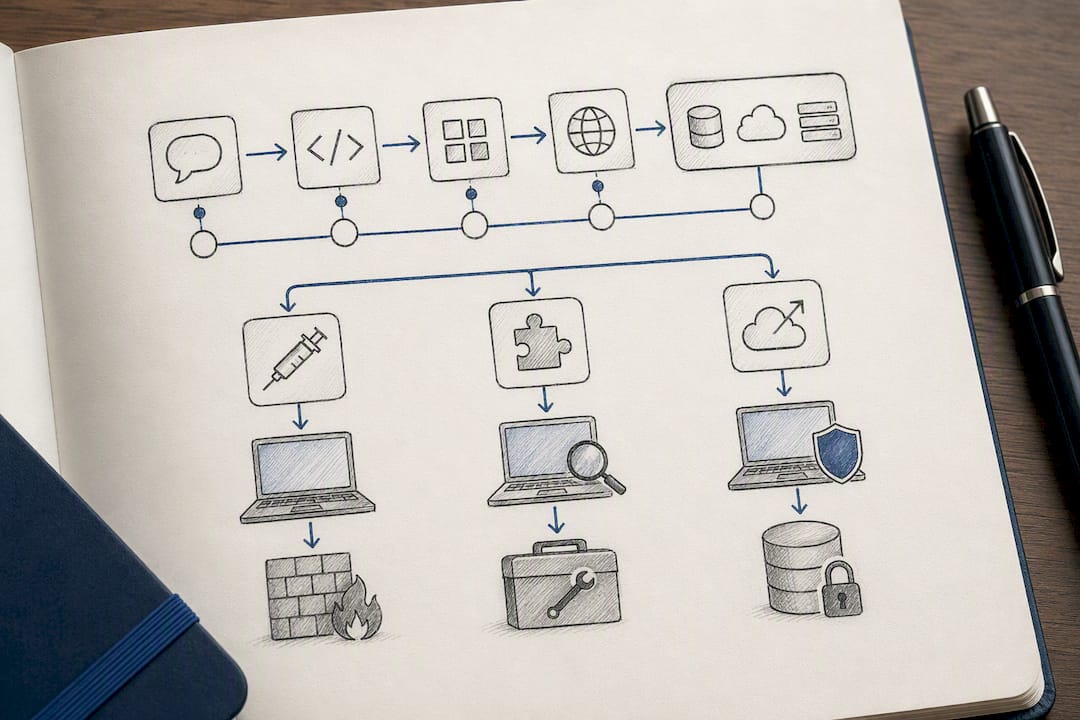
Start by pulling the agent's full event chain: the originating prompt, every pre-tool and post-tool hook that fired, and each downstream system it touched. This is why logging prompts as a linked chain matters so much during a calm period, because during an incident you don't have time to reconstruct it from scattered logs.
Isolate the endpoint the agent was running on, but also check every resource that agent's credentials could reach, since a compromised agent with broad MCP connections can touch far more than the machine it started on. If the agent was using long-lived credentials rather than ephemeral tokens, rotate everything that credential touched, not just the one flagged system.
Distinguish between three distinct failure modes early: a prompt injection that manipulated the agent's behaviour, a compromised plugin or extension feeding it bad instructions, or a genuine data exfiltration event where sensitive content left through an agent's normal, permitted actions. Each demands a different remediation path. A prompt injection needs a detection rule update. A compromised plugin needs an allowlist review across your entire fleet, not just the affected machine. Exfiltration needs a data governance conversation about why that agent had access to that data at all.
Update your playbook after every incident, real or simulated. Agent behaviour patterns shift with every model update, and a playbook written for last year's Copilot version may miss this year's failure modes entirely.
What does continuous monitoring look like for AI copilots?
Point-in-time audits don't work for agents, because their behaviour changes with every model update, every new plugin, and every new MCP connection a user adds without asking anyone. Monitoring has to run continuously, not quarterly.
The practical version of this maps an agent's full lifecycle, install, version changes, plugin additions, to specific alerting rules, so a newly modified agent generates a high-fidelity triage path rather than adding to the noise your analysts already ignore. That mapping is the difference between monitoring that catches drift and monitoring that just produces more dashboards nobody checks.
Watch for a few specific signals on an ongoing basis: sudden spikes in tool-call frequency, new MCP server connections that weren't part of the original approval, prompt patterns that resemble known injection techniques, and any agent suddenly requesting broader data access than its baseline. None of these look alarming in isolation. Together, they're the pattern that precedes most agent-related incidents.
Review your detection rule false-positive rates on a set cadence, monthly is reasonable for most teams, because rules tuned for one Copilot version can drift out of alignment as Microsoft ships updates. A rule that was accurate in March can start flagging normal behaviour in June if the underlying agent changed how it structures tool calls.
Feed everything back into the same evidence chain you use for incident response. Continuous monitoring and incident readiness should draw from one dataset, not two separate systems that analysts have to reconcile manually during a live event.
What compliance obligations apply to Copilot use in the enterprise?
Compliance teams are still catching up to what agents actually do inside regulated data flows, and most existing frameworks weren't written with autonomous tool-calling in mind. That gap is your problem to close, not theirs to solve alone.
The starting point is straightforward: every agent that can read or move regulated data, personal information, financial records, health data, needs to sit inside your existing data governance framework, not a separate AI carve-out. If your organisation already classifies data under a framework tied to privacy or financial regulation, extend that same classification to whatever agents can access that data, and enforce the same handling rules through the policy primitives already described.
Auditors will want to see three things clearly documented: what agents exist, what each one is authorised to access, and evidence that those authorisations get reviewed on a schedule. This is precisely why the evidence chain approach to logging pays off twice, once for incident response, and again when an audit asks you to demonstrate that a specific agent's access was appropriate for the data it touched.
Retention policy needs specific attention here. Raw prompts can contain regulated data incidentally, a user pastes a customer record into a chat window without thinking about it, so your default logging posture should favour prompt hashes and redaction flags over storing raw text, keeping full prompt content behind encrypted, access-controlled review rather than in a general-purpose log store.
Build adversarial testing into your compliance cadence, not just your security cadence. Regulators increasingly expect evidence that you've tested your own systems against manipulation, not just that you've deployed detection tools and hoped they work.
How do you train staff on the risks Copilot introduces?
Most security awareness training still talks about phishing and password hygiene. Almost none of it addresses what happens when an employee pastes a client contract into a Copilot prompt to get a quick summary, which is now one of the most common ways sensitive data leaves an organisation.
Training needs to cover the specific, unglamorous failure mode: agents don't need to be hacked to cause a leak. A well-meaning employee asking an AI assistant to "clean up" a spreadsheet full of customer records, or summarise an unreleased financial report, creates exposure without any attacker involved at all. Staff need to understand that pasting data into a Copilot-style tool is functionally the same as sending it to a third party, because in many configurations, that's exactly what's happening.
Run this training by role rather than as a single organisation-wide module. Developers using Copilot inside an IDE face different risks (leaking proprietary code, approving tool calls without reading them) than finance staff using a Copilot integration inside a spreadsheet. Tailor the examples to what each group actually does.
Make the reporting path obvious and low-friction. If an employee notices an agent behaving oddly, requesting unusual permissions, or connecting to something unfamiliar, they need one clear place to flag it, ideally the same channel they'd use to report a phishing email. Security teams that bury AI reporting inside a general IT ticket queue lose the early signals that matter most.
How should model updates and lifecycle changes be governed?
Every Copilot update is a new attack surface review, whether your team treats it that way or not. Microsoft and other vendors ship model updates on their own schedule, and those updates can quietly change how an agent interprets instructions, calls tools, or handles edge cases your detection rules were tuned against.
Treat model version changes the same way you'd treat a major software release: with a review step before it reaches production use, not after. That review should check whether existing detection rules still fire correctly against the new version's behaviour, and whether any previously blocked prompt patterns now slip through because the model responds differently.
Plugin and extension updates deserve the same scrutiny as the underlying model. A Copilot integration that adds a new MCP connection or extends its tool permissions in a routine update can silently expand what that agent can touch, well past what your original risk assessment covered.
Keep a versioned record of which agent version was running at any given time, tied into the same evidence chain used for incident response and audits. When an incident happens six weeks after a quiet model update, you need to know immediately whether that update is a plausible factor, not spend a day reconstructing the timeline from scattered change logs.
Alectura's perspective: where AIDR fits around runtime protection
Runtime protection from Microsoft and policy frameworks from your governance team solve different halves of this problem, and neither one gives you a live inventory of every AI tool actually running across your fleet. That's the gap Alectura sits in. AI Detection & Response discovers shadow AI and Copilot-style agents you didn't know were installed, inventories what each one can touch, and watches MCP connections and downstream data flows continuously, feeding the same evidence chain your SOC and compliance teams already need.
Alectura's own analysis of Copilot's data leakage patterns and guidance on prompt injection detection both grew out of watching how agents actually behave once they're live in a fleet, not how vendor documentation describes them in theory. The honest opinion here: audit-mode inspection and a written policy feel like enough progress, but without continuous discovery, you're only ever watching the agents you already know about. Most breaches involving Copilot-style tools won't come from the sanctioned deployment. They'll come from the extension nobody approved.
— Nathan
Get visibility over every Copilot agent before you write another policy
Alectura closes the exact gap this article keeps circling back to: you can enforce detection rules and write governance policy all day, but none of it matters if half your Copilot agents never showed up in the inventory to begin with. Alectura's platform runs continuous shadow AI discovery across your endpoints, surfacing every Copilot instance, browser assistant, and MCP-connected agent your teams have quietly adopted, then layers on prompt timeline tracking, real-time detection for secrets and PII, and policy enforcement that doesn't slow anyone down.

If you've been running audit-mode detection without knowing whether your inventory is complete, that's the actual risk sitting underneath your current setup. Alectura also publishes a running breakdown of where individual AI tools leak data and how to guardrail them, useful reading if you're building your own risk register. The next step is straightforward: request a discovery pilot and see exactly what's running across your fleet right now, before you decide what policy to write around it.
Sources
Start with Microsoft's AI agent runtime protection and Copilot Studio external security provider docs, plus the IOActive governance report and hardening playbook referenced throughout.
- Security challenges in AI adoption: 2026 - IOActive