
Securing Windows-hosted copilots means treating each copilot as a runtime identity: discover what's running, baseline behaviour in audit mode, then enforce guardrails. The core approach is discover, then audit, then enforce, never the reverse. If you do nothing else this quarter, turn on discovery across your fleet and start a two-week audit-mode pilot on your highest-risk device group.
TL;DR:
- Discover all running copilots and MCP servers on endpoints, as shadow AI tools often operate unnoticed and outside traditional visibility.
- Focus on agent hooks emitting OpenTelemetry GenAI fields, as they are essential for accurate attribution and effective detection of copilot actions.
- Conduct a two-week audit-mode pilot with high-risk teams to establish a baseline, then gradually implement enforcement once behavior stabilizes.
- Use agent-specific audit trails capturing prompts, invoked tools, and approval status to support investigations and demonstrate compliance.
- Keep component updates and platform features under regular review because permission scopes and detection efficacy can shift with new releases or patches.
Table of Contents
- What the threat surface looks like on Windows endpoints
- Detection signals and defensive controls you can implement now
- Pilot and rollout playbook: audit → baseline → tune → enforce
- Audit trails, evidence and governance for investigations
- Alectura and author perspective: what teams will see and the deployment timeline
- Threat modeling specific to Windows Copilot environment
- User access control and permission management
- Data privacy considerations and data handling policies
- Integration with existing Windows security features
- Update and patch management for Windows Copilot components
- Incident response strategies tailored for Windows Copilot security breaches
- Editorial take: what enterprise security teams get wrong about copilot risk
- How Alectura fits into the copilot security rollout
- Sources
- FAQ
What the threat surface looks like on Windows endpoints
A Windows copilot is never just a chat window. It sits inside what's increasingly called an agentic fabric: a web of instructions, memory, skills, connectors, MCP servers and sub‑agents that together decide what the assistant can see and do. Each piece can look harmless in isolation. A connector that reads a shared drive is fine. A skill that drafts emails is fine. Put them together with a memory store that persists across sessions, and you've built something with far more reach than any single component suggests.
That's the composability problem, and it's the one most security teams underestimate. Agentic fabric analysis shows that runtime authority gets assembled dynamically, often outside the visibility of traditional endpoint tooling, which was built to watch processes and files, not prompts and tool calls.
The attack patterns that exploit this are already well documented:
- Prompt injection, where hidden instructions in a document, email or webpage hijack the copilot's next action.
- Over-scoped connectors, where an integration granted broad read access gets used for a narrow task, then quietly reused for something riskier.
- Token misuse, where long-lived credentials issued to an agent get replayed outside their intended context.
- Silent exfiltration, where sensitive data leaves through a legitimate-looking tool call rather than an obvious file transfer.
None of these require malware in the traditional sense. They exploit permission, not payload.
Detection signals and defensive controls you can implement now
Start with inventory. You cannot detect anomalous copilot behaviour if you don't know which agents and MCP servers are actually running on your endpoints. Vendor discovery tools are catching up here, but shadow AI discovery in tools like Microsoft Defender still only covers supported agents in preview rollouts. Treat that inventory as a starting map, not a finished audit.
Once you have a baseline, four detection techniques do most of the heavy lifting:
- Process ancestry walking. Trace child processes back through their full parent chain and correlate them against a known agent's entity ID, so an action taken three hops downstream still gets attributed to the copilot that triggered it.
- DNS and network rules. Flag connections to known AI provider endpoints and MCP server addresses, and tag gateway traffic early rather than waiting for a detection rule to catch it later, a point detection engineering research makes explicitly.
- Sensitive-file access detections. Watch credential stores, SSH key paths and browser cookie jars for reads initiated by an agent process rather than a human-driven one.
- Agent hooks emitting OpenTelemetry GenAI fields. Instrument the pre-tool-call and prompt-submission points so every action carries the prompt, tool name and approval state.
That fourth point matters more than the others combined. It's the one technique that closes the attribution gap between "something happened" and "this copilot did it, at this step, with this approval."
Pro Tip: Push for agent hooks that emit standard OpenTelemetry GenAI semantic fields rather than a vendor-proprietary log format. One well-instrumented hook lets a single portable detection rule correlate prompt to action across every agent you onboard later, instead of writing a new parser each time.
Pilot and rollout playbook: audit → baseline → tune → enforce
Roll out runtime protection the way Microsoft Defender for Endpoint's AI agent runtime protection recommends: audit first, enforce second, never the reverse.
Pick your pilot group deliberately. Choose one or two teams with genuinely high exposure, finance, legal, or an engineering group with broad file-system access, running copilots your tooling already supports. Run the pilot for one to two weeks in audit mode only.
During that window:
- Collect every alert without blocking anything.
- Label false positives as they surface, don't wait until the end of the window.
- Tune detection thresholds against what you're actually seeing, not what the vendor's defaults assumed.
- Document the baseline: what's normal connector use, typical file access patterns, expected DNS destinations.
The insight from Defender's own rollout guidance is blunt: the first several weeks should be treated purely as learning, not enforcement. Only move to block mode once alert volume has settled and you can explain every remaining anomaly.
Enforcement triggers should be explicit and written down before you flip the switch, not decided in the moment. Feed alerts into your existing SIEM and SOAR pipelines rather than building a parallel console, and write a rollback plan into the same change ticket as the enforcement date. On credential hygiene, push for ephemeral secrets with short TTLs and per-task scoping, since research into enterprise copilot risk points to static, long-lived tokens as one of the most common ways a scoped integration turns into a standing liability. Our AIDR pilot checklist is a reasonable starting template if you're building this internally.
Audit trails, evidence and governance for investigations
An investigation into a copilot incident is only as good as the trail it leaves. Standard endpoint logs tell you a process ran. They don't tell you which prompt triggered it, whether a human approved the action, or which connector supplied the data. You need an agent-specific audit trail that captures all three.
That trail should record, at minimum:
- The prompt or instruction that initiated the action.
- The specific tool call, connector, or MCP server invoked.
- The approval state, whether a human signed off, whether it ran autonomously, or whether it was blocked.
Tamper-evident, hash-chained logging matters here because a standard log file can be edited after the fact, which weakens its value as evidence in a breach investigation or a compliance audit. Export these logs to your SIEM and SOAR platforms for retention and correlation against other endpoint telemetry, rather than leaving them siloed in a vendor console nobody checks until something goes wrong.
One governance move worth adopting early: treat the combination of connector, skill and memory store as a single policy object, not three separate approvals. A connector that's safe alone and a skill that's safe alone can still produce an unsafe combination, so approve or deny the composed unit, not its parts in isolation.
Alectura and author perspective: what teams will see and the deployment timeline
Most teams running their first audit-mode pilot are surprised by two things: how many AI tools were already running unnoticed, and how quickly a proper baseline forms once discovery is switched on.
Some AI Detection & Response platforms approach this the way EDR approached devices a decade ago, giving security teams visibility and control over the AI running on an endpoint similar to that which EDR gave over processes and binaries. They discover and inventory AI tools across the fleet, including copilots, assistants and MCP servers, monitor what each one connects to, detect sensitive data exfiltration, and let teams set guardrails without impacting user productivity.
Practical rollouts focused on Microsoft Copilot and MCP server exposure can realistically be delivered in two to four weeks for a pilot device group, provided the goal for that window is a baseline, not full enforcement.
A workable pilot checklist looks like this: confirm discovery coverage for the agents in scope, run audit mode for the full window, review false positives weekly, and only schedule enforcement once the anomaly count has stabilised.
— Nathan
Threat modeling specific to Windows Copilot environment
Generic AI threat models don't map cleanly onto Windows because Copilot-style assistants inherit the OS's own trust boundaries. A copilot running under a user's identity token can touch anything that user's account can touch, which on a typical enterprise endpoint includes shared drives, cached credentials, and often other SaaS sessions via single sign-on.
Model the threat in three layers. First, the input layer: what can inject instructions into the copilot, a document, an email, a webpage rendered inside a browser extension. Second, the authority layer: what the copilot can actually invoke once instructed, file reads, connector calls, sub-agent delegation. Third, the exfiltration layer: where output can go once generated, a chat log, a shared document, an external API call through an MCP server.
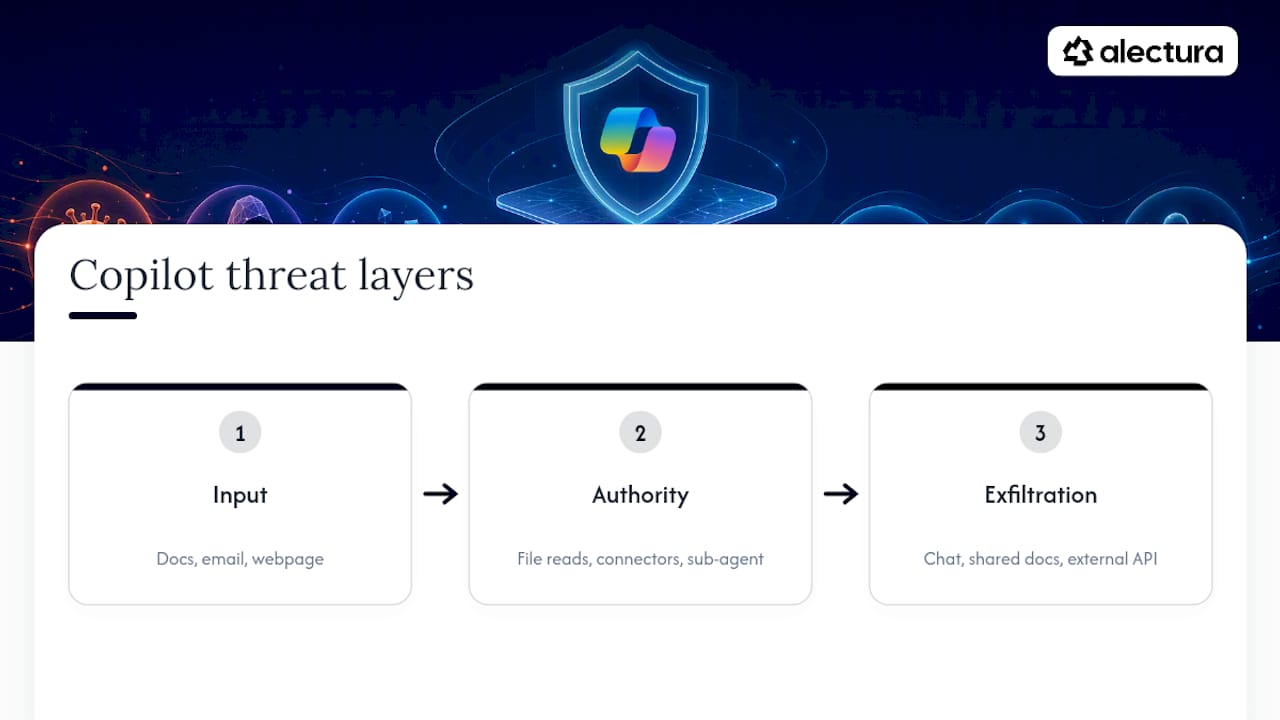
The mistake most teams make is modelling only the third layer, focusing entirely on data loss prevention while ignoring how instructions get injected in the first place. A breakdown of Copilot-specific leak paths is useful here because it maps what actually leaks in practice rather than what's theoretically possible.
Threat modelling for a Windows Copilot environment should also account for sub-agent delegation, where one copilot spins up a secondary agent to complete a subtask. That secondary agent frequently inherits the parent's permissions without inheriting the same scrutiny, which is exactly the kind of authority creep process ancestry walking is designed to catch.
User access control and permission management
Static role-based access control doesn't map cleanly onto copilots, because a copilot's effective permission at any moment depends on what it's been instructed to do, not just who's logged in. Standard RBAC answers "can this user open this file." It doesn't answer "should this agent, acting on this user's behalf, be allowed to summarise this file and send the summary externally."
Per-task scoping closes that gap. Rather than granting a copilot standing access to a connector or data source, grant access for the duration of a specific task and revoke it automatically once that task completes. This is the same logic behind ephemeral credentials, just applied to permission grants generally rather than tokens specifically.
Layer in approval gates for higher-risk actions. Read access to a shared drive might run without friction. Sending an external email, modifying a file in a regulated repository, or invoking a connector with write access to a production system should require an explicit human approval step, logged as part of the agent's audit trail.
Review permission grants on a schedule, not just at onboarding. Copilot permissions tend to accumulate the same way SaaS app permissions did in the 2018 to 2020 wave of shadow IT, quietly, through convenience, until nobody remembers why a given connector was ever approved. A quarterly review of standing connector and skill grants catches this before it becomes a live risk.
Data privacy considerations and data handling policies
The privacy question with Windows copilots isn't just "does this leak data externally." It's "where does the copilot's memory persist, and who can access it later." A copilot that remembers a user's previous conversations to personalise responses is storing something, and that something might include customer records, legal advice, or health information depending on what the user typed.
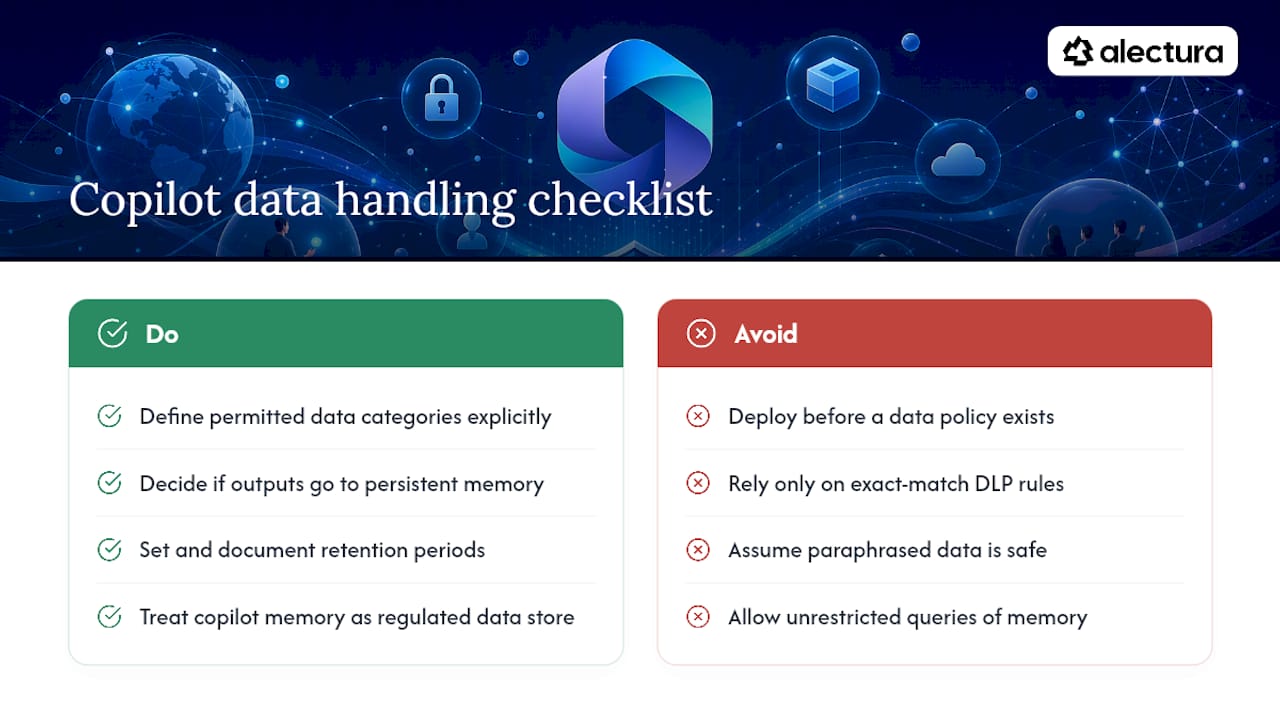
Set a clear data handling policy before you deploy, not after. Decide explicitly what categories of data a copilot is permitted to process, whether outputs can be stored in persistent memory, and how long that memory is retained. Where regulated data is involved, personal information, financial records, health data, treat the copilot's memory store the same way you'd treat any other data repository subject to your existing privacy obligations, because from a compliance standpoint, it is one.
Redaction matters more here than in most data loss prevention contexts because copilots often generate new text that paraphrases sensitive input rather than copying it verbatim. A DLP rule built to catch an exact string match on a credit card number won't catch a copilot's own summary of that same number. Guardrails built specifically to stop data leaving through AI tools need to account for this paraphrasing behaviour, not just pattern-match on raw input.
Document retention periods for prompts and outputs explicitly, and make sure your data handling policy states who can query historical agent memory during an investigation, since that's precisely the artefact a breach inquiry will ask for first.
Integration with existing Windows security features
Copilot security doesn't replace your existing Windows security stack, it extends it. Microsoft Defender for Endpoint's AI agent runtime protection is designed to sit alongside standard endpoint detection, not instead of it, which means alerts from copilot-specific telemetry should route into the same investigation workflow your team already uses for conventional malware and lateral movement.
BitLocker plays a role here too, though an indirect one. Full-disk encryption protects data at rest, including any local memory store or cache a copilot maintains on-device. It does nothing, however, to stop a copilot with legitimate access from reading and exfiltrating that same data while the device is unlocked and the user is authenticated, so treat BitLocker as one layer of a stack, not a control against agent misuse specifically.
The practical integration point most teams miss is correlation. A copilot-triggered file access and a Defender-flagged process anomaly happening on the same device within the same minute are almost certainly related, but only if your SIEM is set up to correlate agent-specific telemetry against standard endpoint alerts using a shared entity ID or timestamp window. Without that correlation, you get two disconnected alerts instead of one clear incident, and an analyst spends twenty minutes manually joining dots your tooling should have joined automatically.
Update and patch management for Windows Copilot components
Copilot components update on a different cadence than the rest of your Windows fleet, and that mismatch creates its own risk window. The underlying model, the connector integrations, and the local agent runtime can each ship updates independently, sometimes weekly, which means a permission model you validated last month may already have shifted by the time you re-check it.
Track copilot and connector versions the same way you'd track any other software inventory item, with a defined patch cadence and a change log that flags when a connector's permission scope changes, not just when its version number does. A connector update that silently expands from read-only to read-write access on a shared resource is the kind of change that should trigger a fresh review, not sail through because it arrived bundled in a routine update.
Preview and beta features deserve particular scrutiny. Much of the current runtime protection tooling, including Defender's own agent protection capability, is still rolling out in preview, which means detection coverage can change between releases without much warning. Build a habit of re-running your audit-mode baseline after any significant platform update to your copilot or its runtime protection layer, rather than assuming last quarter's tuning still holds. A patch that changes how an agent authenticates or how it invokes a connector can quietly invalidate detection rules you spent weeks tuning.
Incident response strategies tailored for Windows Copilot security breaches
A copilot-related incident needs a different first move than a conventional malware event. Isolating the device is still correct, but the next question, what did the agent actually do, requires evidence a standard EDR timeline won't fully answer. You need the agent-specific audit trail: the prompt that triggered the action, the tool or connector invoked, and whether a human approved it.
Build a response runbook that starts with pulling that trail before anything else, because reconstructing intent after the fact from process logs alone is far harder than reading a properly captured prompt-to-action record. If your tamper-evident logging is exporting to SIEM and SOAR as it should, this step takes minutes rather than hours.
Containment differs too. Revoking a compromised user's session might not stop an already-delegated sub-agent that inherited a token before revocation took effect, so containment playbooks need an explicit step for revoking agent-level credentials separately from user-level ones. Check ephemeral token expiry windows as part of this step, since a short TTL limits how long a compromised credential remains useful even if revocation lags slightly.
Post-incident, feed findings back into your audit-mode baseline. An incident is the clearest signal you'll get that a detection rule was too loose or a connector's scope was too broad, and that feedback loop is what turns a single bad day into a permanently tighter posture rather than a one-off fix.
Editorial take: what enterprise security teams get wrong about copilot risk
The industry's default advice treats copilot security as a policy problem: write an AI usage policy, train staff, done. That's not wrong, exactly, but it's incomplete in a way that matters. Policy tells people what they shouldn't do. It says nothing about what an agent does autonomously, at 2am, three tool calls deep into a task nobody's watching in real time.
The judgement the research actually supports is narrower and more useful: start with discovery, because you cannot govern what you haven't found, and every audit-mode pilot I've seen described in vendor documentation surfaces more running agents than the security team expected going in.
Where conventional advice falls short is treating detection and governance as sequential phases you finish once. They're not. A connector's scope changes with a routine update, a new sub-agent gets delegated authority nobody explicitly approved, and last quarter's baseline quietly stops being accurate. The teams that get this right treat audit mode as a standing discipline, not a one-time step before enforcement.
Prioritise agent hooks emitting OpenTelemetry GenAI fields above almost everything else on this list. Without that attribution layer, every other control is guessing at intent after the fact.
— Nathan
How Alectura fits into the copilot security rollout
Alectura is AI Detection & Response built specifically for the discover, audit, enforce sequence this guide walks through. It maps directly to the playbook above: shadow AI discovery to build your inventory, device-level inspection that catches risky agent behaviour and sensitive data before it leaves the endpoint, and policy governance for approving or denying connector, skill and memory combinations rather than each piece in isolation. Unlike tools that only watch network traffic after the fact, Alectura inspects and enforces at the point where the request originates, on the device itself.
If you're evaluating an AIDR platform, ask a few pointed procurement questions: which copilots and MCP servers does discovery actually cover today, how does the platform attribute a downstream action back to the originating agent, and what does the audit trail look like when your SOC pulls it for an investigation. Alectura's Full agentic endpoint security plan is built around exactly this model, and the platform overview walks through the sensor and console architecture if your engineering team wants the technical detail before a pilot conversation. Book a look at the platform and see what your own fleet's audit-mode baseline turns up in the first two weeks.
Sources
- Set up AI agent runtime protection with Microsoft Defender for Endpoint (Preview) - Microsoft Defender for Endpoint | Microsoft Learn
- AI agents on endpoints expose an ungoverned identity layer
- AI Agent Detection Engineering: Endpoint Security Gaps
- Shadow AI Just Showed Up on Your Endpoints
FAQ
What does "Windows Copilot security" actually mean for a SOC?
It means treating any copilot or assistant running on a Windows endpoint as a runtime identity with its own permissions, connectors and memory, not just another application. Practically, that means discovering which agents run where, baselining their behaviour in audit mode, then enforcing guardrails once that baseline is stable.
Should we start in audit mode or enforce guardrails immediately?
Start in audit mode. Microsoft's own runtime protection guidance recommends a baseline period before enabling blocks, because enforcing rules against an untuned detection set produces false positives that erode trust in the whole rollout.
How long does a copilot security pilot usually take?
A focused pilot on Microsoft Copilot and MCP server exposure can realistically run two to four weeks for a single high-risk device group, covering discovery, a one to two week audit-mode window, and initial tuning.
What's the single highest-value detection investment?
Agent hooks that emit OpenTelemetry GenAI semantic fields, capturing the prompt, tool call and approval state at the point of action. This closes the attribution gap that standard endpoint logs leave open and lets one detection rule correlate intent to action across multiple agents.
Does Alectura replace Windows Defender or BitLocker?
No. Alectura works alongside existing controls like Windows Defender and BitLocker, adding AI-specific discovery, inventory and guardrails at the device level rather than replacing endpoint detection or disk encryption. Pricing for the Full agentic endpoint security plan is available directly from Alectura.