
Effective AI assistant monitoring means endpoint-native AI Detection & Response, discovering, classifying and enforcing on the device before a prompt or upload leaves it. Network-only tools see AI activity too late, because agents can read a file, build a prompt, and upload it within seconds, faster than most SOC alerting cycles. Tools like Microsoft Purview cover data classification well; the gap is device-level enforcement, which is where a platform like Alectura sits.
TL;DR:
- Discovery should focus on process trees, browser activity, and data exposure signals, not just staff surveys, to identify shadow AI tools on endpoints.
- AI assistants pose a risk because their combined capabilities can act with unsafe authority, especially through prompt injection and credential inheritance.
- Endpoint-native detection intercepts AI activity before data leaves, using content-aware inspection of prompts, uploads, and context rather than relying solely on malware signatures.
- Enforcement in the first 90 days should be proportional, with graduated responses like coaching, warnings, redaction, and blocking based on risk level.
- Building a baseline of user behavior specific to roles and data access improves detection accuracy and reduces false positives in AI assistant monitoring.
Table of Contents
- How do you discover AI assistants and MCP servers on endpoints?
- What makes AI assistants a distinct threat model?
- What detection signals actually catch risky AI behaviour?
- How should security teams enforce policy and triage incidents?
- What's a realistic 90-day rollout for AI assistant monitoring?
- How does user behaviour analytics fit into AI assistant monitoring?
- What compliance frameworks apply to AI assistant monitoring?
- How should incident response differ for AI assistant events?
- Author perspective: operational priorities and common pitfalls
- Get endpoint-level AIDR without the network-layer blind spot
- Sources
- FAQ
How do you discover AI assistants and MCP servers on endpoints?
You cannot govern what you cannot see, and most security teams underestimate how many AI tools are already running across their fleet. Browser copilots, IDE plugins, desktop assistants, and Model Context Protocol (MCP) servers connecting to internal systems all leave traces, but only if you know where to look.
Discovery starts with process trees and browser session data, not with a survey asking staff what they use. You need to catch the extension nobody registered, the connector token issued six months ago and forgotten, and the MCP server a developer spun up to speed up a sprint.
Build your inventory from these signals:
- Process-level telemetry: process ID, parent process ID, and binary hash to identify the actual application, not just its window title.
- Browser and plugin activity: active extensions, IDE integrations, and copilot sessions tied to a specific tab or workspace.
- Connector and MCP evidence: npm package identifiers, OAuth scopes granted, and destination domains the tool talks to.
- Data exposure: accessed file paths and Microsoft Information Protection (MIP) labels on anything the tool touches.
| Signal type | What to capture | Why it matters |
|---|---|---|
| Process | PID, parent PID, binary hash | Confirms the real app behind a generic process name |
| Connector | OAuth scopes, npm/extension ID | Reveals what the tool can access, not just that it exists |
| Network | Destination domains | Flags unsanctioned egress before data leaves |
| Data | File paths, MIP labels | Ties discovery directly to data classification |
Prioritise by access, not popularity. An agent with read access to a finance share matters more than ten copilots with none. A DSPM-style approach, mapping AI activity against existing data classification, turns a flat inventory into a risk-ranked one. Alectura's own MCP discovery work found that organisations can surface shadow MCP servers within a 90-day sweep once continuous inventory replaces one-off audits, a useful benchmark for setting your own first-quarter target. For a step-by-step runbook, this AI tool discovery playbook walks through the sweep in more detail.
What makes AI assistants a distinct threat model?
AI agents don't fail the way traditional software fails. They combine memory, connectors, and skills into what researchers call an "agentic fabric," where each piece looks harmless alone but the combination creates unsafe authority. A calendar-reading skill plus a document-summarising skill plus an email-sending connector isn't three small risks. It's one large one, and it's rarely reviewed as a single unit.
Prompt injection is the mechanism that turns composability risk into an active incident. A malicious instruction hidden in a document, email, or web page gets read by the assistant and treated as a command, not content. Because the agent already holds the user's session and credentials, it can act immediately, with no phishing click required, no malware download.
The credential problem compounds it. Most AI assistants inherit the logged-in user's identity rather than getting their own scoped one. That means a compromised or manipulated agent operates with full human-level access, and the OWASP LLM Top 10 explicitly maps excessive agency to this exact failure.
Watch for these sequences specifically:
- Clipboard content pasted into a prompt within seconds of copying from a sensitive document.
- A single session reading multiple files across different sensitivity labels in rapid succession.
- An upload event immediately following a prompt that referenced financial, health, or credential data.
Agentic workflows can chain a file read, a prompt build, and an upload in under three seconds, a speed that outruns most legacy DLP and network monitoring entirely.
What detection signals actually catch risky AI behaviour?
Detection logic built for malware doesn't transfer cleanly to AI assistants. You're not looking for a known-bad signature. You're looking for a legitimate tool doing something contextually wrong, which means content awareness matters as much as process awareness.
Start by treating copilot sessions and AI processes as their own activity category, distinct from generic application use. A browser tab running a chat interface behaves differently to a browser tab reading news, and your telemetry should separate them from the start.
Layer in content-aware classification next. Contextual natural language processing on prompt text, combined with document-level MIP labels, tells you whether a prompt references confidential material even when the prompt itself never names it. Endpoint DLP designed for large language models inspects clipboard events, paste actions, typed prompts, and file uploads locally, which is the only place fast enough to intervene before data leaves.
Behavioural detection catches what content inspection misses:
- Anomalous API call volume from a single agent session.
- Rapid multi-file reads across unrelated sensitivity levels within one session.
- Egress to a domain the connector has never contacted before.
- Token scope use that exceeds what the connector was originally granted.
Correlate every one of these with identity and connector provenance. A finance analyst's copilot reading a payroll file is expected; the same copilot reading it at 2am through a connector added last week is not. Real-time inspection of prompts and uploads across both approved and shadow tools is what turns isolated signals into a fidelity-checked alert rather than noise.
Pro Tip: Log connector scope grants the moment they're issued, not when you first notice suspicious activity. Retroactively reconstructing what an OAuth token could access is far harder than checking a record you already captured.
For deeper technical detail on catching manipulated prompts specifically, see this guide to prompt injection detection.
How should security teams enforce policy and triage incidents?
Enforcement only works if it's proportional. Block everything and staff route around it with personal devices; allow everything and you've got no control at all. The middle ground is a graduated response tied to risk level, not a single switch.
- Allow low-risk prompts with no sensitive data references, no logging friction needed.
- Coach users in real time when a prompt edges toward risky content, a pop-up explaining why, not a hard stop.
- Warn on borderline uploads, giving the user a chance to reconsider before the action completes.
- Redact sensitive fields automatically from prompts or stored transcripts before they reach the model.
- Block high-risk actions outright, and isolate the device when the pattern suggests active compromise rather than a mistake.
Every one of these decisions needs an audit trail specific to the agent, not just the user. Record the prompt, the response, the process context, the connector scope in use, and the data lineage behind whatever file or field was touched. This is what lets an investigator reconstruct why an action happened, not just that it happened.
That evidence needs a home. Feed it into your existing SIEM/SOAR stack rather than building a parallel console:
- Push structured alerts with severity scoring into your SIEM for correlation against other endpoint events.
- Route confirmed incidents into SOAR playbooks for automated containment steps.
- Retain transcripts and connector logs against your existing eDiscovery and retention policy.
- Tag each incident with the regulatory category it touches (personal data, health data, financial data) at capture time, not during review.
Endpoint DLP integrated with unified audit logging already supports this kind of capture for supported generative AI apps, and pairing it with agent-specific context closes the gap those tools leave for unsanctioned assistants. A DLP approach built specifically for AI prompts and uploads covers the redaction and output-control side in more depth.
What's a realistic 90-day rollout for AI assistant monitoring?
Trying to govern every AI tool on day one is how these programs stall. Sequence the work instead, starting narrow and expanding once the false-positive rate proves manageable.
Days 0 to 30:
- Run a full discovery sweep across a representative slice of the fleet, not just flagship departments.
- Build a high-risk user list based on connector scope and data access, not job title alone.
- Pilot endpoint controls on that representative group before any fleet-wide rollout.
Days 30 to 90:
- Deploy endpoint-native detection and enforcement broadly, tuning thresholds against the pilot's false-positive data.
- Wire alerts directly into existing SOC playbooks so triage doesn't require a new console habit.
- Formalise governance: privacy review, pseudonymisation where prompts contain personal data, and named executive sponsorship.
| KPI | What it tells you |
|---|---|
| Shadow AI detection rate | How much of the fleet's real AI footprint is now visible |
| Prevented prompt/upload events | Whether enforcement is actually stopping exfiltration, not just logging it |
| Mean time to triage | Whether SOC analysts can act on agent alerts as fast as other endpoint alerts |
| False-positive rate | Whether coaching and warning thresholds need retuning |
Compliance and privacy teams should sit in on week one, not week ten. Retrofitting pseudonymisation into a system already capturing prompt content is far messier than designing it in from the start.
How does user behaviour analytics fit into AI assistant monitoring?
Behavioural baselines matter more for AI assistants than for almost any other endpoint activity, because "normal" varies enormously by role. A legal team member querying a copilot about contract clauses all day is unremarkable; the same volume of queries from someone in a role with no drafting responsibilities is worth a second look.
User behaviour analytics (UBA) in this context means building a per-role or per-user baseline of typical prompt volume, typical connector use, and typical file-access patterns tied to AI sessions, then flagging deviations. This isn't the same as generic UBA for login anomalies. It has to account for the fact that a single AI session can touch dozens of files or make dozens of API calls in a way a human clicking through a file explorer never would.
The strongest signal is usually a change in pattern, not just volume. A user who normally asks an assistant to summarise emails suddenly asking it to extract and reformat structured financial data is a pattern shift worth flagging, even if the raw prompt count looks unremarkable. Combining this with connector provenance, whether the AI tool making the request is one that's ever touched this kind of data before, cuts down on false positives substantially, because volume-only thresholds tend to flag your busiest legitimate users constantly.
Feed these baselines back into your enforcement tiers. A deviation from baseline is a reasonable trigger for the "coach" or "warn" tier rather than an automatic block, since context often explains an anomaly that a rigid rule would misread as malicious.
What compliance frameworks apply to AI assistant monitoring?
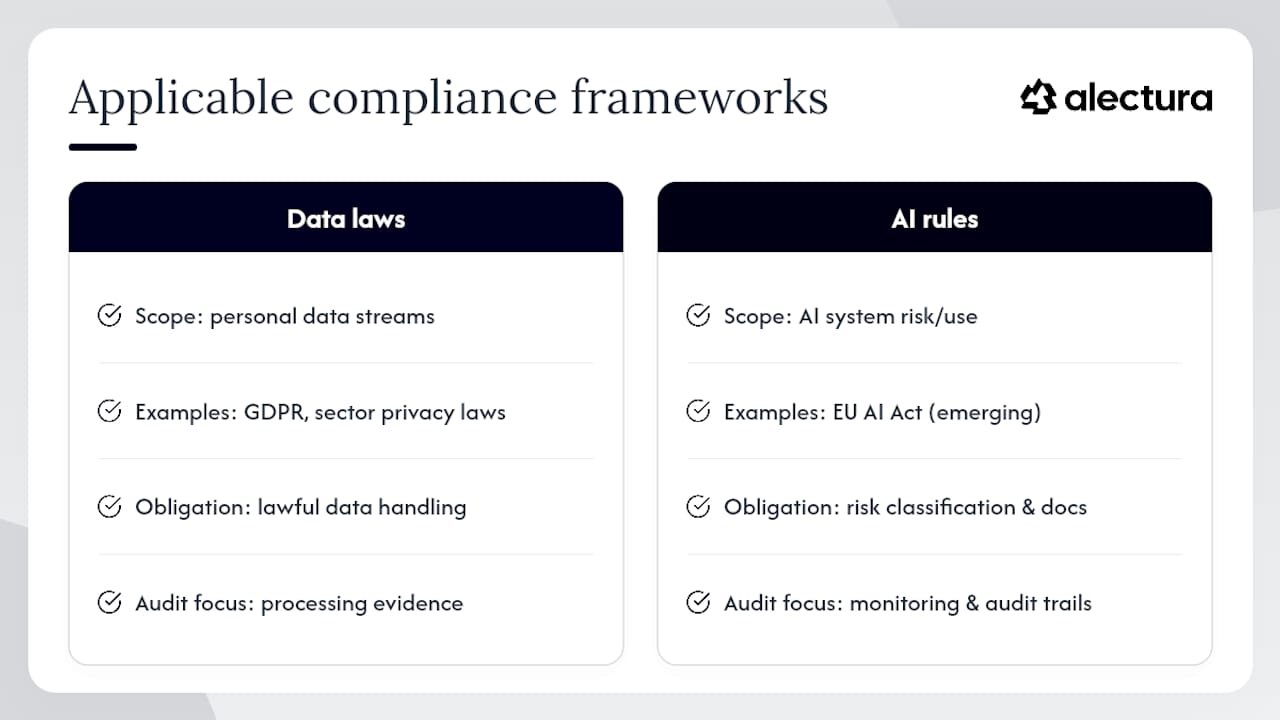
No single regulation was written with AI copilots in mind, but several existing frameworks already govern the data these tools touch. The obligation usually attaches to the data, not the tool, which means your existing compliance mapping mostly extends rather than replaces.
Personal data flowing through a prompt or a stored transcript falls under data protection law wherever your organisation already reports, GDPR obligations in the EU/UK, equivalent state and sector laws elsewhere, and any sector-specific health or financial privacy regime that already applies to that data at rest. If a prompt asks an assistant to summarise a customer's health record, that transcript inherits the same regulatory weight the health record itself carries, regardless of which AI tool processed it.
The emerging AI-specific regulatory layer, the EU AI Act being the most developed example, adds obligations tied to risk classification of the AI system itself, not just the data it touches. Where your organisation falls under that Act's scope, monitoring and audit-trail requirements for high-risk AI use cases stack on top of your existing data protection obligations rather than replacing them.
Practically, this means your audit trail needs to satisfy two different reviewers: a data protection officer asking "was personal data handled lawfully," and an AI governance reviewer asking "was this AI system's risk classification and use documented correctly." Unified audit logging that captures prompts, responses, and data lineage in one place gives both reviewers what they need from a single evidence source rather than two disconnected logs. Before deploying third-party AIDR tooling, run it through the same vendor risk process you'd apply to any other data processor, this vendor due diligence framework is a reasonable structure to adapt.
How should incident response differ for AI assistant events?
A prompt injection incident doesn't look like a phishing incident, and treating it with the same playbook wastes the first, most critical hour. The attacker isn't tricking a human into clicking something. They're tricking an already-trusted agent into acting.
Your first triage question needs to be different: not "did the user click something malicious," but "what did the agent have access to when it received the injected instruction, and what did it do with that access." That means your incident response playbook needs the agent's connector scope and session history pulled immediately, not requested from IT twenty minutes into the call.
Containment looks different too. Isolating the device stops further action, but you also need to revoke or pause the specific OAuth tokens and connector sessions the agent was using, because the same credentials may still be valid on another device or a cloud-hosted instance of the same assistant. A device-level isolation alone can leave a live session open elsewhere.
Build your AI-specific IR runbook around these steps:
- Pull the full prompt and response transcript for the session in question, not just the flagged message.
- Identify every connector and data source the agent touched in that session, using the audit trail as the source of truth.
- Revoke or rotate credentials and tokens tied to that session, not just the device.
- Determine whether the injected instruction came from an external document, email, or web page, and trace how it entered the agent's context.
- Document the incident against your existing regulatory reporting thresholds immediately, since AI-related data exposure often crosses the same notification triggers as any other breach.
Post-incident, feed what you learned back into your detection tuning. An injection technique that worked once will get reused, and your enforcement policy tiers should reflect it.
Author perspective: operational priorities and common pitfalls
Discovery should come before enforcement, always. Teams that buy blocking tools before they've mapped what's actually running end up blind to the 30% of tools they never inventoried, while frustrating the users on tools they did find. Get visibility first, then layer proportional enforcement, coaching and warning before outright blocks, because heavy-handed rollouts push staff toward personal devices, which is worse than the risk you started with.
The pitfalls I see repeatedly are organisational, not technical: no clear executive sponsor, privacy teams brought in after logging design is already locked, and pilots run only on low-risk departments that never surface the real edge cases. Fix the sponsorship and privacy sequencing before you fix the tooling.
— Nathan
Get endpoint-level AIDR without the network-layer blind spot
Alectura is built around the exact gap this article covers: network and cloud-only tools see AI activity after it's already left the device, and by then the prompt's gone. Alectura discovers sanctioned and shadow AI tools directly on the endpoint, inventories what each one can access, and enforces policy locally before a prompt or upload leaves the machine, with audit trails detailed enough to satisfy both a SOC investigator and a compliance reviewer.

When you're evaluating an AIDR platform, test three things specifically: how complete its discovery sweep is against tools you already know are running, how much latency its enforcement decision adds to a normal prompt, and how cleanly its alerts land in your existing SIEM/SOAR stack rather than a bolt-on console. If you're still mapping the terminology, the AI security glossary covers shadow AI, prompt injection, MCP and AIDR in plain terms. For teams ready to see how the category fits their existing security stack, the agentic endpoint security page breaks down the model this article describes. When you're ready to scope a deployment, check Alectura's pricing for the Full Agentic Endpoint Security plan and start a trial against your own fleet.
Sources
- AI and Microsoft Purview — Microsoft Learn
- Securing AI agents on endpoint devices: Closing the new security blind spot - Kitecyber
- Data Security for AI | Secure Data Across Shadow & Approved AI | Proofpoint US
FAQ
What is AI Detection and Response (AIDR)?
AIDR is endpoint-native security that discovers AI tools running on a device, inventories what they can access, and enforces policy on prompts and uploads before data leaves the endpoint.
How is AI assistant monitoring different from network-based DLP?
Network DLP inspects traffic after it leaves the device, while endpoint-native enforcement acts at the point a prompt or upload is created, fast enough to intervene before agentic workflows complete.
Can prompt injection be detected at the endpoint?
Yes. Correlating clipboard activity, typed prompts, and file access with connector provenance lets you flag injected instructions that trigger unexpected agent behaviour, an approach detailed in this prompt injection detection guide.
How much does Alectura cost?
Pricing for Alectura's Full Agentic Endpoint Security plan is available on the Alectura pricing page rather than published as a flat figure.
What KPIs matter most in the first 90 days of a rollout?
Shadow AI detection rate, prevented prompt/upload events, mean time to triage, and false-positive rate are the four metrics worth tracking from day one.