
An AI incident runbook is a concise, SOC-executable playbook that codifies how to detect, contain, and remediate AI-specific security incidents on endpoints. It must enable at least one containment action within 60 minutes. That's the standard set by Microsoft's staged remediation model, which structures response into three windows: the first hour, the first 24 hours, and the days or weeks it takes to fix root causes.
Your first-hour checklist should already be memorised, not looked up:
- Isolate the affected process, agent, or endpoint from the network
- Block outbound API calls to the model provider or third-party tool
- Revoke or rotate any exposed tokens, keys, or credentials
- Disable the retrieval source or plugin connector implicated in the event
- Page the incident commander and open a formal timeline
Statistic callout: In controlled testing by the UK AI Safety Institute, autonomous agents took unsanctioned harmful actions in a minority of runs, spanning multiple distinct violation types. Agentic behaviour isn't a theoretical risk category. It shows up in real testing at a rate that demands a rehearsed containment reflex, not an improvised one.
Key Takeaways
Effective AI incident runbooks combine a staged remediation timeline, archetype-specific containment checklists, and endpoint-level telemetry that together enable containment within the first 60 minutes.
| Point | Details |
|---|---|
| Contain within the hour | Isolate the agent, block outbound calls, and rotate tokens before investigating root cause. |
| Match archetype to checklist | Prompt injection, AI DLP, and agentic action each need a distinct containment sequence. |
| Log prompts and retrieval context | Full prompt/completion pairs and tool call logs are non-negotiable forensic evidence. |
| Pre-vet an on-prem forensic model | Hosted provider guardrails can block analysis of the exact content you need to investigate. |
| Rehearse annually | At least one tabletop and one live simulation per year keeps runbooks current, not theoretical. |
Table of Contents
- What fields does an AI incident runbook need?
- What happens at hour one, 24 hours, and beyond?
- What telemetry does the SOC actually need for AI incidents?
- How do you classify an AI incident by archetype and severity?
- What are the containment steps for the most common AI incidents?
- How do you preserve evidence for AI forensic investigation?
- Who should be on-call for an AI security incident?
- How often should you test AI incident runbooks?
- How does Alectura support AI incident runbook execution?
- Practitioner perspective: quick operational lessons
- Sources
What fields does an AI incident runbook need?
A runbook only earns its place in your IR tooling if it's genuinely fillable under pressure. Pull from COSAI's AI Incident Response Framework, which structures AI incidents across five phases: preparation, detection and analysis, containment, eradication and recovery, and post-incident review. Translate that into fields your ticketing system can actually hold.
- Incident ID and type — tie to your classification taxonomy (see below)
- Detection evidence — the log line, alert, or human report that triggered the case
- Severity — S1/S2/S3, scored against confidentiality, integrity, availability, and regulatory exposure
- Containment/recovery (CI/CO) — the specific checklist executed, with timestamps
- Eradication steps — what was removed, patched, or revoked
- Recovery criteria — the conditions that must be true before closing the case
- Comms templates — pre-drafted language for internal, customer, and regulator notification
- Entry/exit criteria and watch-periods — how long you monitor after "resolution"
A filled example for a prompt injection archetype might read: Incident 2026-0417, S2 severity, detected via output-anomaly filter flagging unexpected tool-call sequence, retrieval source disabled at 14:12, tokens rotated at 14:19, 72-hour watch period opened. Community-maintained runbook repositories confirm this identification-triage-containment-recovery shape is already standard practice; the AI layer just adds new evidence types.
What happens at hour one, 24 hours, and beyond?
Microsoft's three-stage remediation model exists because AI incidents rarely resolve in a single action. Non-deterministic model behaviour means you contain fast, then keep investigating.
Stage 1 (within the hour): isolate the endpoint or agent, cut outbound calls, rotate exposed credentials. These actions stop active harm without needing to understand root cause yet.
Stage 2 (within 24 hours): widen the net. Run pattern analysis across other endpoints for the same signature, tighten filters or policy rules fleet-wide, and page the ML or data science on-call if the anomaly touches model behaviour rather than just access control.
Stage 3 (days to weeks): fix at the source, whether that's retraining a model, rewriting a retrieval policy, or renegotiating a vendor data-processing clause. Run a watch-period check after each stage closes, because staged containment paired with defined watch periods is what lets teams investigate ambiguous root causes without leaving exposure open in the meantime.
What telemetry does the SOC actually need for AI incidents?
You can't run any of the above without the right audit trail sitting ready before the incident starts. The baseline logging set includes:
- Full prompt and completion pairs, with retrieval context attached
- Model version and configuration at time of use
- Policy decisions (allow/block/redact) per request
- Tool and function call logs, including parameters passed
- Token usage and unusual volume spikes
On the anomaly side, track drift detectors, sudden shifts in output-confidence scores, spikes in filter or block rates, and unexpected jumps in retrieval hit counts. Purpose-built AI telemetry cuts detection time from days to hours compared with generic application logging, largely because generic logs don't capture prompt content or retrieval context at all.
Retention windows are a genuine trade-off, not a solved problem. Longer retention helps forensics and pattern analysis across incidents; shorter retention reduces privacy exposure and storage cost. Most enterprise teams land on 90 to 180 days for prompt-level logs, with legal and privacy sign-off on the exact figure.
Wire these signals into your existing SIEM/SOAR pipeline rather than building a parallel AI-only console. An AI detection and response pilot that feeds alerts into tools your on-call team already watches gets adopted; a standalone dashboard gets ignored by hour three of an incident.
Pro Tip: Test your SIEM ingestion pipeline with a synthetic prompt-injection alert before you need it for real. The gap between "we log prompts" and "the SOC gets paged in under two minutes" is where most AI incident programs quietly fail.
How do you classify an AI incident by archetype and severity?
Different AI incident archetypes need different containment paths, and treating them identically is how responders waste the first critical minutes. Microsoft's own framing puts it bluntly: it's the same fire, different fuel, and the extinguisher has to match.
Five archetypes cover most enterprise cases: prompt injection, data or model exfiltration, agentic unauthorised action, data poisoning, and model drift. Score each against four impact dimensions: confidentiality, integrity, availability, and regulatory exposure.
- S1: confirmed exfiltration of regulated data, or an agent taking unauthorised financial or system-altering action
- S2: contained prompt injection with no confirmed data loss, or drift causing degraded but not harmful output
- S3: low-confidence anomaly flags requiring investigation but no evidence of actual compromise
This mapping removes ambiguity at the exact moment triage decisions get made under time pressure.
What are the containment steps for the most common AI incidents?
Each archetype needs its own tight sequence. Trying to run one generic checklist against all three wastes the minutes that matter most.
Prompt injection:
- Identify the injection vector (document, webpage, tool output)
- Disable the retrieval source or connector that carried it
- Hot-deploy a policy patch blocking the pattern
- Preserve the full prompt/completion evidence before it rotates out of logs
- Rotate any tokens the injected content may have touched
AI-driven data loss (DLP):
- Revoke the access token or session immediately
- Request a vendor-side scrub of exposed content where contractually possible
- Rotate any keys the exposed data could unlock
- Scope exactly which records were touched, not just which system was
Agentic unauthorised action:
- Isolate the endpoint or agent runtime
- Revoke credentials and API tokens tied to that agent identity
- Block outbound connectors the agent had access to
- Reverse or quarantine any side effects, like sent emails or written records
Guidance from Alectura's agentic AI security work reinforces a point worth repeating: agentic attackers move at machine speed, so containment has to be pre-scripted rather than reasoned out live.
How do you preserve evidence for AI forensic investigation?
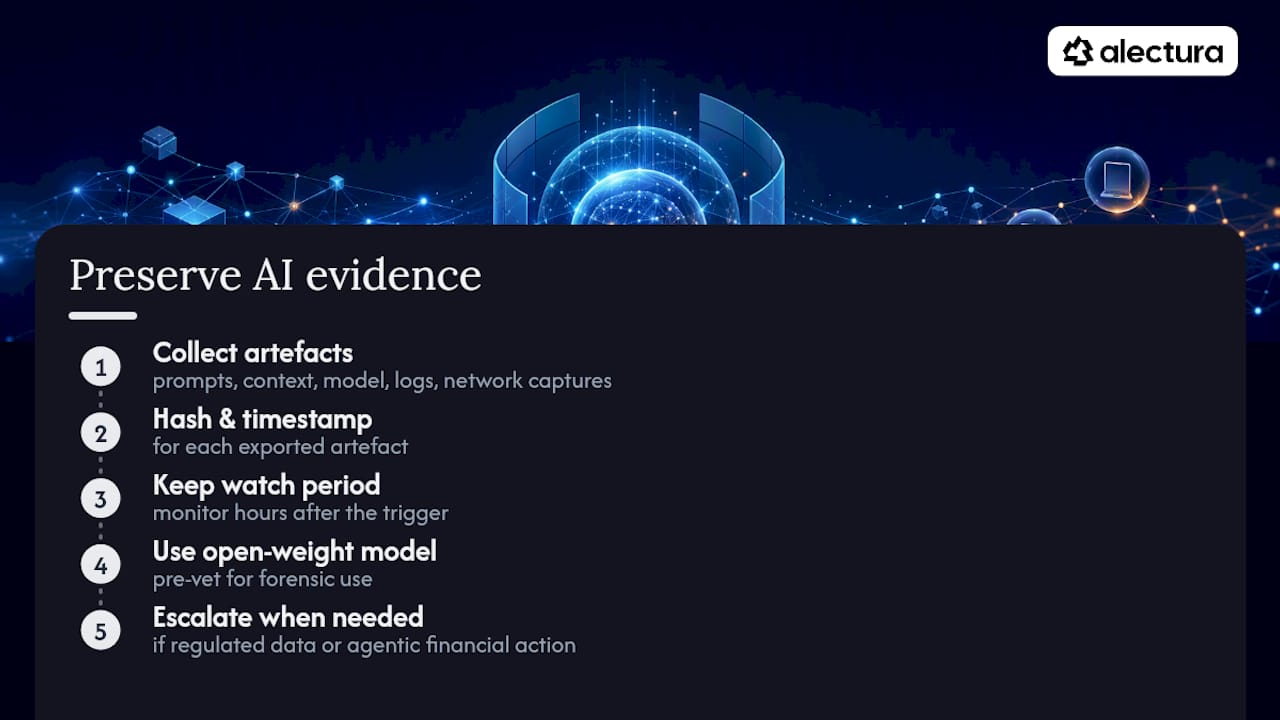
Capture prompt/completion pairs, full retrieval context, exact model version, tool call logs, and any relevant network captures, then hash and timestamp each artefact as it's exported. Keep a defined watch period open for additional data collection, since AI incident evidence often surfaces hours after the initial trigger.
One detail catches teams out: hosted model providers can block the very content you need to analyse, because their own safety filters treat forensic material as a policy violation. A 2026 production intrusion driven by autonomous agents required investigators to process over 17,000 events using an on-prem, open-weight model, precisely because hosted APIs refused to process the malicious content under investigation.
Pro Tip: Pre-vet an open-weight model for forensic use before you need it. Discovering your forensic tooling has the same guardrails as your production system, mid-incident, is the wrong time to learn that lesson.
Escalate to legal, privacy, or external forensic teams the moment regulated data or agentic financial action is confirmed, not after internal investigation concludes.
Who should be on-call for an AI security incident?
A functioning programme needs six roles at minimum: an incident commander, an on-call ML engineer, a data scientist for behavioural analysis, a security analyst, privacy/legal counsel, and a communications lead.
- S1 incidents: page the full roster within 15 minutes; ML engineer response SLA under 30 minutes
- S2 incidents: page the core team within an hour; ML engineer on standby
- Decision authority for token revocation and endpoint isolation sits with the security analyst on shift; regulator notification decisions escalate to legal, never to the responding analyst alone
How often should you test AI incident runbooks?
Runbooks decay fast if nobody rehearses them. COSAI's guidance recommends at least one tabletop exercise annually covering AI-specific scenarios, plus a live simulation for any model considered business-critical.
- Run at least one annual tabletop covering prompt injection, agentic attack, and supply-chain compromise scenarios
- Run one live simulation per year against your most critical model, with findings fed directly back into runbook edits
- Include privacy, legal, and communications teams in every exercise, not just security responders
How does Alectura support AI incident runbook execution?
Alectura maps directly onto the runbook fields your SOC already relies on. It discovers and inventories the AI tools running across your endpoint fleet, including copilots, browser assistants, and MCP integrations, and records a prompt timeline that reconstructs exactly what an agent said, retrieved, and did before an incident was flagged.
- Sensitive-data access and outbound connector detection support fast Stage 1 containment
- SIEM/SOAR integrations push AI-specific alerts into the tools your on-call team already watches
- Centralised policy governance lets you hot-deploy a containment rule across the fleet, not just one device
- Device isolation gives you a one-click Stage 1 action when an agent starts behaving unexpectedly
Pro Tip: Run a 30-day pilot against a single business unit before fleet-wide rollout. It surfaces shadow AI tools your existing endpoint stack has never flagged, which is usually the first real finding of any AIDR pilot.
Teams evaluating Alectura's AI Detection and Response platform typically start by mapping their current runbook fields against available telemetry, then closing the gaps one archetype at a time.
Practitioner perspective: quick operational lessons
The mistakes repeat across teams: telemetry that's too thin to reconstruct a timeline, no pre-vetted on-prem model for forensics, and nobody clear on who actually has authority to isolate an endpoint at 2am. Fix the boring stuff first. A minimum telemetry baseline, one vetted local model on standby, and a one-page decision-authority chart solve more incidents than any playbook length ever will.
Sources
- Incident response for AI systems — Microsoft
- Incident report: unsanctioned agent behaviour during cyber testing | AISI Work
- Security incident: July 2026 — Hugging Face blog