
The right posture for enterprise ChatGPT data loss prevention is layered and AI-native: browser-level DLP, endpoint AI Detection and Response (AIDR), network and API controls, and a single policy source-of-truth mapped to data classification. No single layer catches everything on its own. Cisco's own guidance recommends starting in Monitor mode and auditing usage for one week to one month before flipping specific classifications, like PII or source code, to Block. Microsoft Purview's DSPM for AI adds discovery and capture workflows for enterprise AI apps on top of that.
Three moves to start today:
- Discover first. Pull network App ID logs, browser telemetry, and endpoint inventories to find where ChatGPT and other generative tools are actually running.
- Pilot with monitoring, not blocking. Run a short audit window (1 week to 1 month) on a representative user group before touching enforcement settings.
- Enforce by classification, not by app. Block or redact based on what the data is (PII, secrets, source code), not a blanket ban on the tool.
Statistic to anchor your timeline: Cisco's Umbrella DLP configuration explicitly recommends a monitoring period before switching from Monitor to Block for ChatGPT-bound traffic.
Key Takeaways
Enterprise ChatGPT data loss prevention works when browser DLP, endpoint AIDR, network controls, and classification-mapped policy operate together, not as a single bolt-on tool.
| Point | Details |
|---|---|
| Start with monitoring | Audit ChatGPT usage for a short monitoring period before switching any classification to Block. |
| Discover across four sources | Combine network App IDs, browser telemetry, endpoint inventories, and code repo scans. |
| Map policy to data class | Assign redaction, approval, warning, or blocking per data type, not per app. |
| Log the essentials | Capture prompt hash, user, app, timestamp, classification, and enforcement action. |
| Close the endpoint gap | Alectura's AIDR discovers AI tools and enforces on-device redaction that network-only DLP misses. |
Table of Contents
- Why does ChatGPT create new data loss risks?
- How do you find where ChatGPT and other AI tools are being used?
- How should you classify data for AI-specific policy?
- Where should you enforce controls: browser, endpoint, or network?
- What's the right rollout timeline from monitoring to enforcement?
- What should your audit trail capture for compliance?
- What usually goes wrong when rolling this out?
- What should you look for when evaluating GenAI DLP tools?
- Why endpoint AIDR closes the gap network DLP leaves open
- How Alectura fits into your ChatGPT DLP rollout
- Frequently asked questions
- Sources
Why does ChatGPT create new data loss risks?
Generative AI multiplies the ways sensitive data leaves your organisation. A prompt box is not a file share, but it behaves like one, and most legacy DLP was built to inspect files and emails, not conversational input.
The concrete risks stack up fast: prompt text can persist in vendor logs depending on account tier and settings; free-tier or misconfigured accounts risk model training exposure; developers paste API keys and secrets into prompts to debug faster; support staff paste customer PII to draft a response; engineers paste proprietary source code to get a refactor suggestion; and shadow AI, tools nobody approved, spreads through browser extensions and personal accounts nobody's inventory tracks.
Traditional content-based DLP scans for patterns, a credit card number, a health record identifier, but it has no concept of prompt intent or what an agentic assistant does with data once it's fetched. That gap is exactly where an AI-native layer needs to sit.
How do you find where ChatGPT and other AI tools are being used?
Discovery has to pull from more than one telemetry source, because no single system sees the whole picture. Network logs catch traffic to known AI domains. Browser telemetry catches extensions and copilots that never touch the corporate network the same way. Endpoint inventories catch local AI clients and IDE plugins. Code repositories catch API keys nobody told security about.
A practical runbook looks like this:
- Pull proxy and firewall logs, filtering by App ID for ChatGPT and other generative AI destinations, following the pattern Palo Alto's Enterprise DLP documentation describes for identifying existing ChatGPT traffic before enforcement.
- Audit browser telemetry and installed extensions across the fleet to catch copilots and AI sidebars that don't generate obvious network signatures.
- Run endpoint process and hostname hunts through EDR or AIDR tooling to catch locally installed AI clients.
- Scan code repositories and CI logs for API keys and SDK calls tied to OpenAI, Anthropic, or other model providers.
Capture the evidence that matters at each step: user identity, timestamp, application, file names touched, and where policy allows, the prompt text itself.
How should you classify data for AI-specific policy?
Map sensitivity classes to per-application controls rather than writing one blanket AI policy. Customer PII, regulated data, source code, and trade secrets each warrant a different response, from silent redaction to an outright block.
- Allow with redaction: general PII (names, emails) gets pseudonymised or tokenised before submission, so the model still gets useful context without real identifiers.
- Prompt for justification: source code snippets or internal system names trigger a just-in-time approval step, logging why the user needed to share it.
- Warn and log: low-risk internal data generates a soft warning and an audit entry, no blocking.
- Block outright: API keys, credentials, and regulated health or financial identifiers never leave the device, full stop.
The nuance most policies miss is the difference between redaction (strip it), tokenisation (replace with a reversible placeholder), and pseudonymisation (swap in a fictional but structurally similar value). Pick one method per data type and write it into a single governing policy document, not five conflicting departmental spreadsheets.
Where should you enforce controls: browser, endpoint, or network?
Layered enforcement beats picking one point and hoping it covers everything. Browser DLP catches prompts as they're typed, before submission. Endpoint AIDR catches local AI agents, IDE plugins, and desktop clients that never touch a browser. Network and CASB controls catch API traffic and enterprise app egress. Each layer has a different blind spot, and together they cover the gaps.
| Enforcement point | Strength | Limitation |
|---|---|---|
| Browser DLP | Inline redaction before submission, fast to deploy | Misses non-browser AI clients and IDE plugins |
| Endpoint AIDR | Sees local agents, MCP connections, and process-level context | Requires fleet-wide agent deployment |
| Network/CASB/API | Controls egress at scale, covers sanctioned enterprise apps | Weak on encrypted or client-side prompt content |
| SIEM/SOAR integration | Centralises triage and correlates events across layers | Not an enforcement point itself, needs upstream data |
Vendor examples show where the market is heading. Sentra's Shadow AI DLP pairs discovery with browser-level enforcement so content classification happens locally, without routing the original text off the device. Browser extension tools like Redacta and Redactprompt apply the same local-redaction principle, scrubbing tokens before a prompt ever leaves the tab.
- Use browser DLP where speed and low deployment friction matter most.
- Use endpoint AIDR where agentic workflows and MCP connections need context-aware coverage, as covered in endpoint DLP for AI
- Use network/CASB controls for sanctioned enterprise AI apps with predictable API traffic.
- Feed every layer into SIEM/SOAR so a security analyst gets one queue, not four.
What's the right rollout timeline from monitoring to enforcement?
Move in phases, not in one policy change on a Friday afternoon. Discovery comes first, then a monitoring pilot, then targeted enforcement on high-risk classifications, then broad enforcement once false positive rates settle.
- Weeks 1 to 2: Discovery. Security runs the multi-source telemetry sweep described above; IT confirms endpoint coverage.
- Weeks 2 to 6: Monitor-mode pilot. Following Cisco's recommended audit window of 1 week to 1 month, log prompts without blocking; compliance reviews sample findings; legal signs off on retention terms.
- Weeks 6 to 8: Targeted enforcement. Block or redact for the highest-risk classifications only, credentials and regulated PII, while other categories stay in monitor mode.
- Weeks 8 onward: Broad enforcement. Extend blocking rules once false positive rates and user friction are acceptable to business owners.
Track reduction in sensitive prompts reaching AI apps, false positive rate on redaction triggers, and mean time to triage a flagged event. Budget for a small cross-functional team (security, compliance, one IT lead) plus licensing for endpoint agents and a training cycle for affected business units.
What should your audit trail capture for compliance?
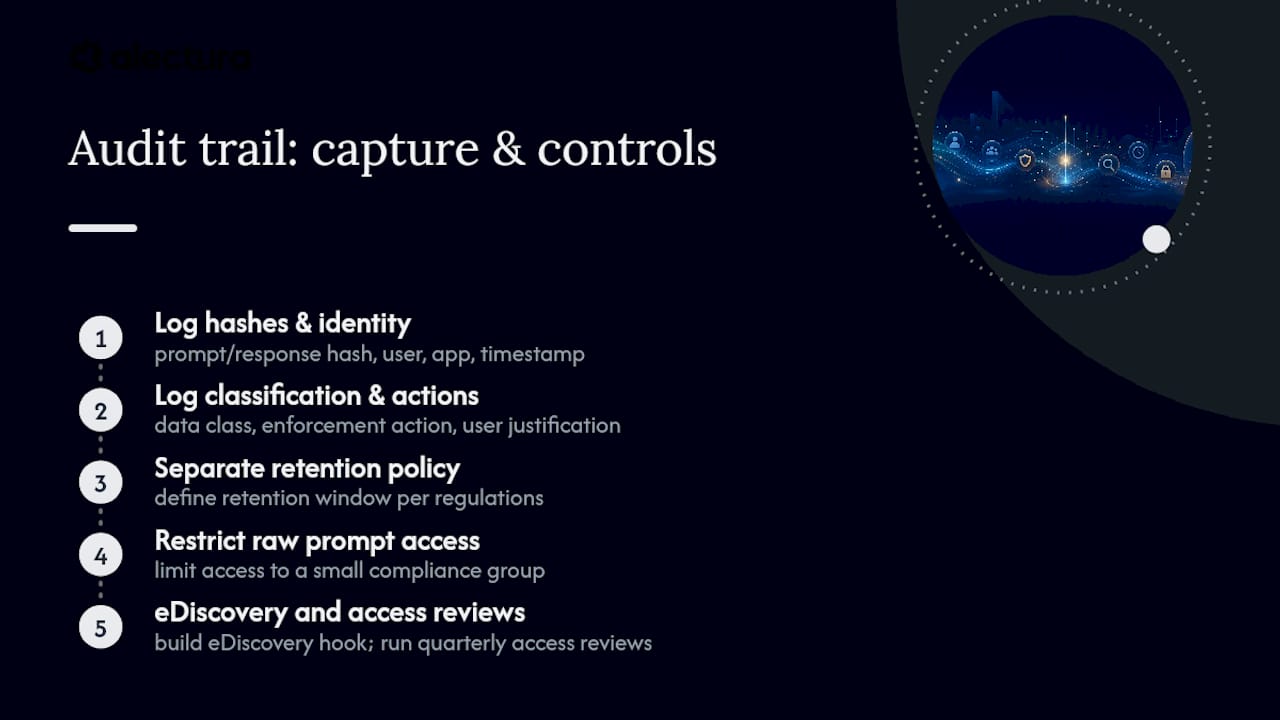
Log the minimum that's still sufficient for an investigation: a hash of the prompt and response, user identity, application, timestamp, data classification triggered, the enforcement action taken, and any justification the user supplied.
Retention policy needs its own decision, separate from general log retention, because prompt content is sensitive by definition. Restrict access to raw prompt text to a small compliance group, define a retention window that satisfies your regulatory obligations (see HIPAA-specific AI compliance for a regulated-data example), and build an eDiscovery hook so legal can pull records without asking engineering for a one-off export.
Every AI interaction log is a potential exhibit. Treat retention and access control with the same discipline you'd apply to email archives, not as an afterthought bolted onto a DLP dashboard.
Pro Tip: Run a quarterly access review specifically on who can read raw prompt logs, not just who can query metadata. That distinction gets missed in most compliance audits.
What usually goes wrong when rolling this out?
Four pitfalls show up repeatedly: teams skip proper discovery and enforce blind, they block too aggressively and users route around it with personal devices, they cover browsers but miss local agents entirely, and they ignore how specific teams actually work before writing policy.
- Start narrow: enforce only on the highest-risk data classes first, expand later.
- Use just-in-time justification prompts instead of hard blocks where context genuinely matters.
- Tune classifiers against real business language, not generic pattern libraries, to cut false positives.
- Keep an exceptions process tied to a named business owner, not a shared inbox nobody checks.
Pro Tip: Feed your classifier's false positives back to whoever owns the policy weekly during the pilot. Classifiers tuned once and never revisited drift badly within a quarter.
What should you look for when evaluating GenAI DLP tools?
Prioritise on-device classification and local redaction, prompt timeline tracking, SIEM/SOAR integration, per-app policy granularity, and API/SDK-level protection for developer workflows.
- Request on-device or in-browser classification so raw content never leaves the endpoint for inspection.
- Require prompt timeline logging with user, app, and timestamp fields, mappable to your SIEM.
- Set pilot acceptance criteria upfront: a false positive ceiling, coverage across your top five AI apps, and MDM-based mass deployment.
- Confirm per-app, per-classification policy control rather than one blanket allow/block toggle.
Why endpoint AIDR closes the gap network DLP leaves open
Network and cloud-only DLP see traffic to known destinations. They don't see a local AI agent reading a file, an MCP server pulling data through an integration, or a browser copilot acting on a page's contents, all of which happen before anything hits the network layer.
Endpoint AIDR sits where that activity actually occurs. Alectura discovers AI tools running across the fleet, tracks prompt timelines per user and app, applies on-device redaction before sensitive content reaches a model, and feeds enforcement events into SIEM and SOAR for triage.
- Fleet-wide discovery of AI clients, copilots, and MCP connections, not just browser traffic.
- Prompt timeline tracking tied to user, device, and application.
- On-device classification and redaction, so raw content stays local.
- SIEM/SOAR integration for centralised incident triage.
A security leader's readiness checklist
I want discovery finished before I touch a single policy toggle. I want pilot metrics, false positive rate, coverage, met before broad enforcement. I want every data class mapped to a specific control. I want endpoint coverage validated on real devices, not a spec sheet. And I want SIEM ingestion live before day one of enforcement.
How Alectura fits into your ChatGPT DLP rollout
Alectura is built for exactly the layer network and cloud DLP can't reach: the endpoint, where local AI agents, browser copilots, and MCP integrations actually touch your data. Instead of routing prompt content off the device for inspection, Alectura classifies and redacts it where it lives, giving you the audit trail and enforcement point that a browser-only or network-only tool structurally can't provide.

Alectura gives your team:
- Fleet-wide discovery of every AI tool in use, sanctioned or shadow.
- On-device classification and redaction before sensitive content reaches a model.
- SIEM and SOAR integration for centralised triage of flagged events.
- Per-app, per-classification policy enforcement mapped to your existing data governance.
If you're planning the monitor-to-enforce timeline outlined above, book a demo with Alectura to see endpoint AIDR running against your own fleet before you commit to a rollout date. Procurement teams evaluating licensing terms can review the Master Subscription Agreement alongside the pilot.
Frequently asked questions
What is ChatGPT DLP? ChatGPT DLP refers to the controls, policy, and enforcement architecture, spanning browser, endpoint, and network layers, that stop sensitive data such as PII, secrets, or source code from reaching ChatGPT or similar generative AI tools without appropriate classification and approval.
How long should you monitor before blocking ChatGPT traffic? Cisco recommends an audit window of 1 week to 1 month in Monitor mode before switching enforcement to Block for specific classifications like PII or source code.
Can traditional DLP tools protect against ChatGPT data loss? Traditional content-based DLP catches obvious pattern matches but generally lacks the context awareness needed for agentic AI workflows, prompt intent, and local AI agent activity, which is why an AI-native, endpoint-aware layer matters.
What should be logged for ChatGPT compliance audits? Capture a hash of the prompt and response, user identity, application, timestamp, data classification triggered, the enforcement action taken, and any justification supplied for the interaction.
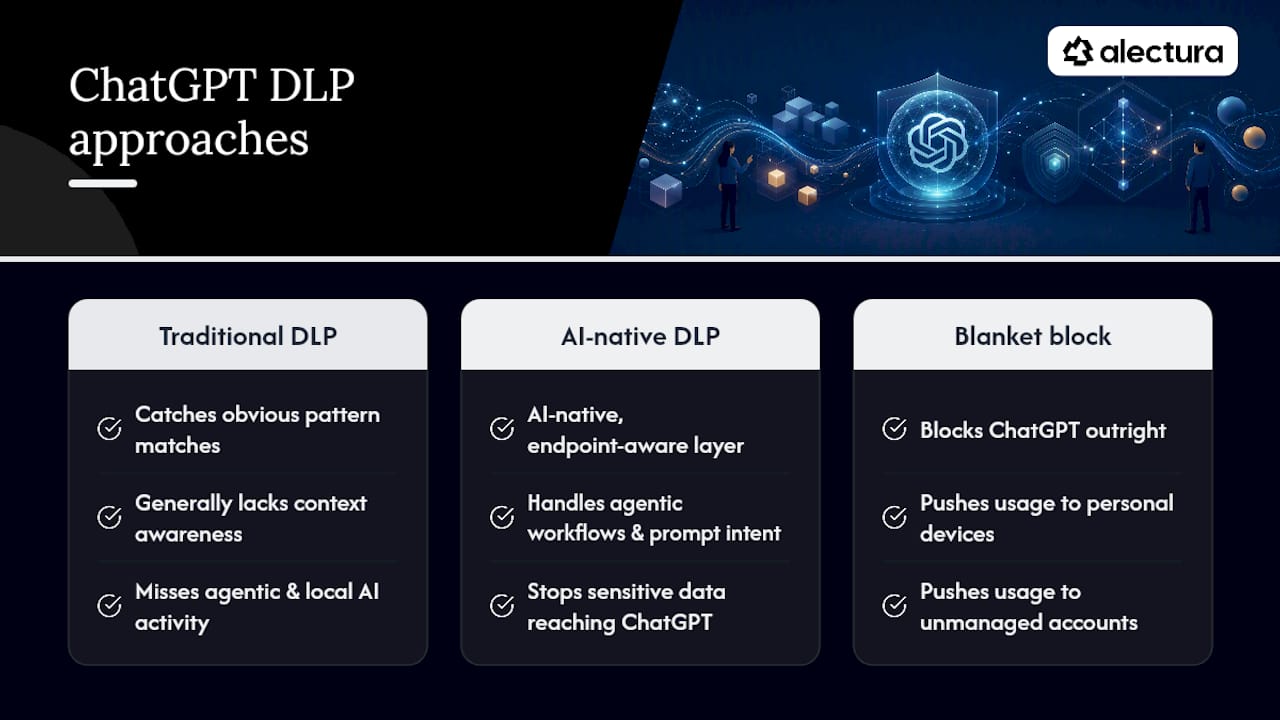
Does blocking ChatGPT outright solve the data loss problem? Blanket blocking tends to push usage toward personal devices and unmanaged accounts outside your visibility, which is why classification-based, phased enforcement generally performs better than an outright ban.
Sources
- Configure DLP to Protect Sensitive Data from Being Used by ChatGPT - Cisco