
Every code assistant, copilot, and CLI tool running on employee laptops is an unmanaged endpoint risk until you can see it. Code assistant security starts with endpoint-first discovery, not network monitoring, because desktop copilots and IDE extensions never touch the tools your firewall watches. Deploy an endpoint agent in monitor-only mode, collect 7 to 14 days of telemetry, then prioritise anything touching regulated data. Skip the baseline and you enforce policy against a fleet you don't actually understand.
TL;DR:
- Deploy an endpoint agent in monitor-only mode across all devices and enable local TLS inspection to accurately identify and document each AI tool running.
- Prioritize tools accessing regulated data by mapping OAuth scopes, payload signatures, and data classification signals to identify real exposure risks.
- Restrict OAuth scopes and rotate tokens for high-risk tools, and enforce short-lived credentials to minimize potential data exfiltration.
- Follow a four-week phased plan, starting with telemetry collection and inventory, then classifying data, tightening scopes, and integrating with SIEM and SOAR systems.
- Recognize that approved tools may still be vulnerable to prompt injections and malicious updates, requiring ongoing monitoring beyond initial vetting.
Table of Contents
- Detect and inventory every code assistant, copilot, and MCP server
- Assess risk: map assistants to sensitive data and triage exposure
- Runtime controls that don't wreck developer output
- A 4-week plan to move from monitoring to enforcement
- How endpoint-first AIDR closes the gap
- A security leader's short take: fast vetting beats blunt blocking
- Explore Alectura for endpoint-first code assistant security
- Sources
- FAQ
Detect and inventory every code assistant, copilot, and MCP server
You cannot secure what you cannot see, and most security stacks are blind to half the AI running on company devices. Browser-based copilots leave some trace in proxy logs. Desktop apps, command-line tools, and IDE extensions with certificate-pinned connections mostly don't.
Four questions define proper code assistant security discovery: which tool is running, which account it's authenticated against, which user triggered it, and what data left the device. Answering all four requires more than a domain list.
DNS filtering, next-gen firewalls, and CASB tools were built for browser and SaaS traffic. They report that a connection went to an AI vendor's domain, not which local binary made the call or what was in the payload. On-device TLS inspection closes that gap by decrypting traffic locally, which reveals full request paths, tenant headers, and the actual process behind the connection, something DNS-only or NGFW-only tooling simply cannot do.
The telemetry worth collecting includes:
- Process names for desktop apps and CLI tools, not just browser tabs
- Tenant headers and OAuth grant scopes tied to each session
- POST payload signatures that hint at prompt content or file uploads
- Extension manifests and locally running MCP server endpoints
Run the discovery phase as a fixed sequence:
- Deploy the endpoint agent in monitor-only mode across the fleet
- Enable local TLS inspection so payloads and tenant data resolve properly
- Let telemetry accumulate for a full 7 to 14 day rolling window
- Review the top tools by usage and assign an owner to each one
Pro Tip: Run the monitor-only window over a full sprint cycle, not a quiet week. A baseline captured during a slow week undercounts CLI-heavy tools that only spike near release day.
Assess risk: map assistants to sensitive data and triage exposure
A policy without data classification is a guess dressed up as governance. Once you have an inventory, the next job is deciding which tools actually threaten something worth protecting.
Start with three buckets: public or non-sensitive data, internal business data, and regulated data covering source code with embedded secrets, customer PII, or anything under contractual confidentiality. A code assistant with broad repository access sitting in the third bucket needs attention before a note-taking copilot in the first.
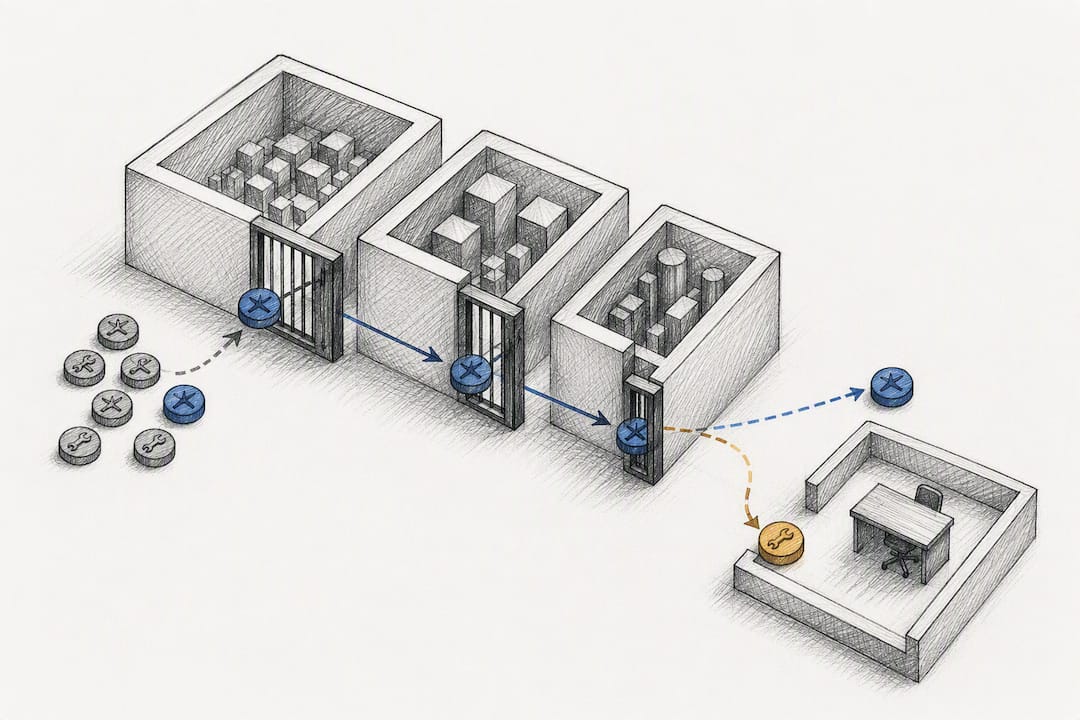
Effective triage joins three separate signal types: identity logs from SSO and OAuth grants, endpoint telemetry showing what the tool actually did, and your data classification. Combining network, identity, and classification signals is what lets a team prioritise by real exposure instead of chasing a list of AI vendor domains.
Watch for these specific red flags during triage:
- OAuth grants scoped to an entire repository or drive, not a single project
- Large outbound POST payloads containing fields that match regulated data patterns
- Personal account logins authenticating against tools with access to shared codebases
- Auto-approval flags enabled on agents with local command execution rights
One incident pattern worth knowing: CLI and coding agents have been abused to execute local commands and exfiltrate secrets specifically when auto-approval settings were left switched on, turning a productivity feature into an open door.
Build a short escalation matrix: regulated data plus broad OAuth scope routes straight to the SOC for immediate review; internal data with narrow scope goes into the standard weekly review queue.
Runtime controls that don't wreck developer output
Guardrails fail the moment they slow developers down enough that people route around them. The fix isn't blanket blocking, it's sequencing controls so restriction never outpaces understanding.
Where possible, allowlist enterprise tenants and scoped OAuth grants rather than blocking a tool outright. A developer using an enterprise-licensed copilot tenant with a narrow scope is a very different risk to the same tool authenticated on a free personal account.
For flows touching regulated data, layer in on-device DLP and prompt redaction, paired with short-lived token enforcement so a leaked credential expires before it's useful. Treat every connector, skill, and memory store attached to an agent as one combined policy object rather than writing separate rules for each piece. That combination is where privilege actually accumulates, and agent sprawl through composability is exactly what turns a helpful assistant into a bigger blast radius than intended.
Sequence the rollout in this order:
- Monitor every tool and connector without touching enforcement first
- Restrict OAuth scopes to the minimum the workflow actually needs
- Apply selective blocking or redaction only to the highest-risk flows
- Reassess quarterly as new connectors and MCP servers get adopted
Pro Tip: Write your redaction rules before your blocking rules. Redaction lets developers keep working while removing the exact field that created risk, which avoids the support tickets a blunt block generates.
Even tools you've already approved aren't automatically safe forever. Prompt injection and malicious MCP updates can manipulate approved tools after the fact, which is why monitoring has to stay active even on the allowlist. For teams scoping this in detail, runtime permission steps for agent connectors covers the mechanics further.
A 4-week plan to move from monitoring to enforcement
Security teams that try to enforce policy on week one, before they understand what's actually running, break developer workflows and generate an inbox full of exception requests. A time-boxed rollout avoids that.
- Week 0 to 1: Deploy the endpoint agent in monitor mode fleet-wide, collect telemetry, and build the first version of the AI tool inventory.
- Week 2: Classify the data each tool touches, start allowlisting enterprise tenants, and require human-in-loop approval for any agent action flagged as risky.
- Week 3: Tighten OAuth connector scopes, rotate or revoke standing tokens, and move high-risk flows onto short-lived credentials.
- Week 4 and onward: Route alerts into SIEM and SOAR, and codify playbooks for device isolation and recovery when an AI-related incident is confirmed.
This sequencing mirrors what practitioners recommend for shadow AI governance rollouts: observe first, enforce second, never the reverse.
| Week | Primary focus | Expected outcome |
|---|---|---|
| 0 to 1 | Deploy monitor-only agent, collect telemetry | First-draft AI tool inventory |
| 2 | Classify data, allowlist tenants | Human-in-loop on risky actions |
| 3 | Tighten scopes, rotate tokens | Short-lived credentials enforced |
| 4+ | SIEM/SOAR integration | Codified isolation playbooks |
How endpoint-first AIDR closes the gap
AI Detection & Response is the practical answer to a problem most security stacks weren't built for. Alectura specialises in AIDR, discovering AI tools, copilots, and MCP connections running across employee devices rather than guessing from network traffic alone.
Endpoint-level inspection means the visibility isn't limited to what crosses a proxy. It extends to agent-aware audit trails that log instructions, tool calls, and connector use, giving investigators something to reconstruct after an incident rather than a gap in the record. Pairing that with SIEM and SOAR integrations turns detection into something your existing security operations can actually act on.
A few resources worth bookmarking for technical teams building this out:
- The AI App Risk Directory for cataloguing discovered tools
- The agentic AI security guide for architecture-level detail
- The AI security glossary for shared terminology across teams
A security leader's short take: fast vetting beats blunt blocking
The teams that get this right treat AI governance as a cross-functional job, not a security team veto. Legal, IT, and engineering leads all need a stake in what gets approved, because a decision made in isolation gets ignored in practice.
Block too aggressively and you don't eliminate risk, you just push it onto unmanaged personal devices where you have zero visibility. A fast, visible approval path for new tools does more to reduce shadow AI use than any blocklist.
And when something does go wrong, you'll be grateful for an audit trail that captured intent, not just a timestamp.
— Nathan
Explore Alectura for endpoint-first code assistant security
Alectura is built specifically to close the gap this article walks through: agentic endpoint security that inspects AI activity at the device before it leaves, rather than trying to catch it after the fact on the network. That distinction matters most for code assistants, since CLI tools and IDE extensions rarely show up in proxy logs at all.
A solution combining shadow AI discovery, enforceable runtime guardrails, and agent-level audit trails is deployed, designed to integrate through existing MDM systems with minimal added latency. Coverage is explicit about its own limits rather than overselling what it catches, which matters when you're building a compliance case, not just a dashboard.
If you're ready to see what's actually running across your fleet, start with a technical trial or review the architecture and plan details for Alectura's full agentic endpoint security offering.
Sources
- Dope
- Real-world attacks on corporate AI agents | Kaspersky official blog
- Enterprise AI agents insider threat — ZDNet
- How to detect and govern shadow AI in your organization — Veeam
FAQ
What Is AIDR in the Context of Code Assistant Security?
AI Detection & Response (AIDR) is endpoint-level discovery, monitoring, and policy enforcement for AI tools, similar to how EDR covers traditional endpoint threats. Alectura applies this model specifically to copilots, IDE assistants, and MCP connections running on employee devices.
Why Doesn't Network Monitoring Catch Desktop Code Assistants?
Most desktop copilots and CLI tools use certificate-pinned connections that network-layer tools can only see at the domain level, not the payload. On-device TLS inspection is needed to attribute traffic to a specific process, account, and user.
How Long Should the Monitor-Only Baseline Run?
A 7 to 14 day rolling window is the standard baseline period recommended before moving to enforcement, giving security teams enough telemetry to understand real usage patterns without disrupting developer workflows.
What's the Biggest Risk With Approved Code Assistants?
Even approved tools remain vulnerable to prompt injection and malicious MCP updates, which is why continuous monitoring for anomalous intent matters even after a tool clears initial vetting.
Does Alectura Replace SIEM and SOAR Tools?
No. Alectura integrates with existing SIEM and SOAR platforms rather than replacing them, feeding agent-aware audit trails and detection events into the security operations workflow teams already run. Pricing details are available on Alectura's pricing page.